AI & Machine Learning14 min6 views
An Image Is Worth 16×16 Words: How AI Actually Sees Your Photos (and What Each One Costs)
A transformer only reads tokens, so how does it read your screenshot? We cut a cat photo into 196 patches, rebuild the Vision Transformer's first step in Python, and work out what a 4K screenshot really costs, and why its small text can come back blurry.
Hey, welcome. This one is a little different from the usual series posts. I will not waste your sec. Trust me.
You've done this a hundred times. You take a screenshot, drop it into a chat, and ask "what's wrong with this error?" or "what does this chart say?". The model reads it like it read your text.
But here's the puzzle. A language model only reads tokens, small chunks of text turned into numbers. A photo isn't text. So where do the tokens come from?
The answer is one of the most elegant ideas in modern AI, and it fits in the title of a 2020 paper: An Image is Worth 16x16 Words. Today we rebuild it with a real photo, and then we use it to work out exactly what your screenshots cost.
In this post:
- Why you can't just feed pixels to a transformer
- The trick: cut the image into patches
- What happens to each patch on the way in
- The code: a cat becomes 196 tokens
- Did it work? What the paper actually found
- The same idea in your chat window: what one image costs
- ⚠️ The trap that catches everyone with screenshots
- Let's be honest about what just happened…
Tighten your seatbelt. There are pictures this time.
1. Why you can't just feed pixels to a transformer
Quick recap for anyone new. A transformer is the model design behind today's chatbots. Its key move is attention: every token looks at every other token to decide what matters.
That "every token looks at every other token" part is the catch. The work grows with the square of the number of tokens.
Now take a small photo, 224 × 224 pixels. That's the size the ViT paper used for pre-training.
224 × 224 pixels      = 50,176 pixels
× 3 colour channels   = 150,528 numbers
pixel pairs to compare = 50,176² ≈ 2.5 billion
If every pixel were a token, one tiny image would need about 2.5 billion attention comparisons, in every layer. Did you get the pain?
For years the answer was a different kind of model, the convolutional neural network (CNN). A CNN slides small filters across the image, looking at a few neighbouring pixels at a time. It's efficient, and it was the king of computer vision for most of the 2010s.
So the question in 2020 was simple. Can a plain transformer, the same one used for text, see?
2. The trick: cut the image into patches
Let me explain it the way I wish someone had explained it to me.
Don't treat each pixel as a word. Cut the image into small squares, called patches, and treat each square as a word.
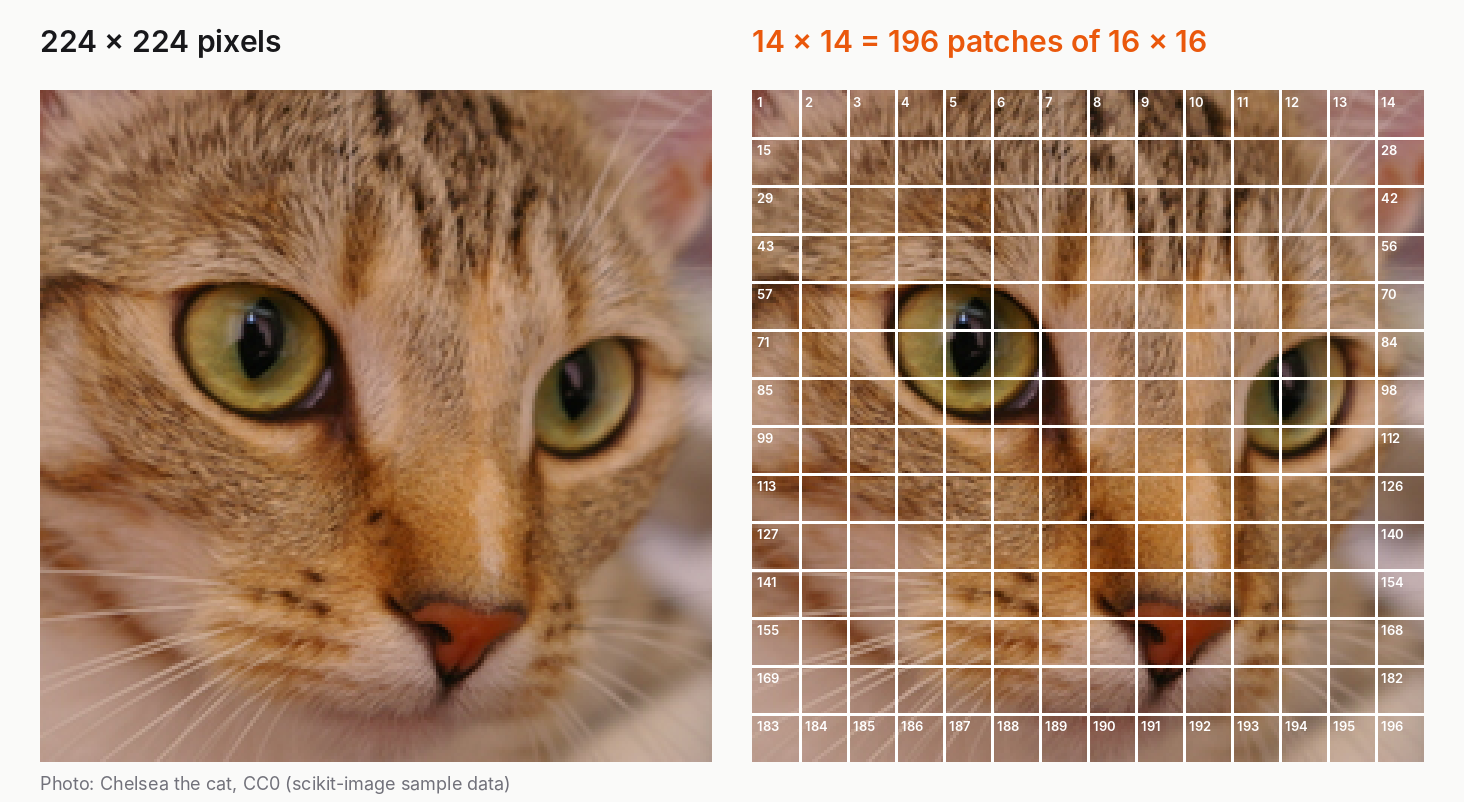
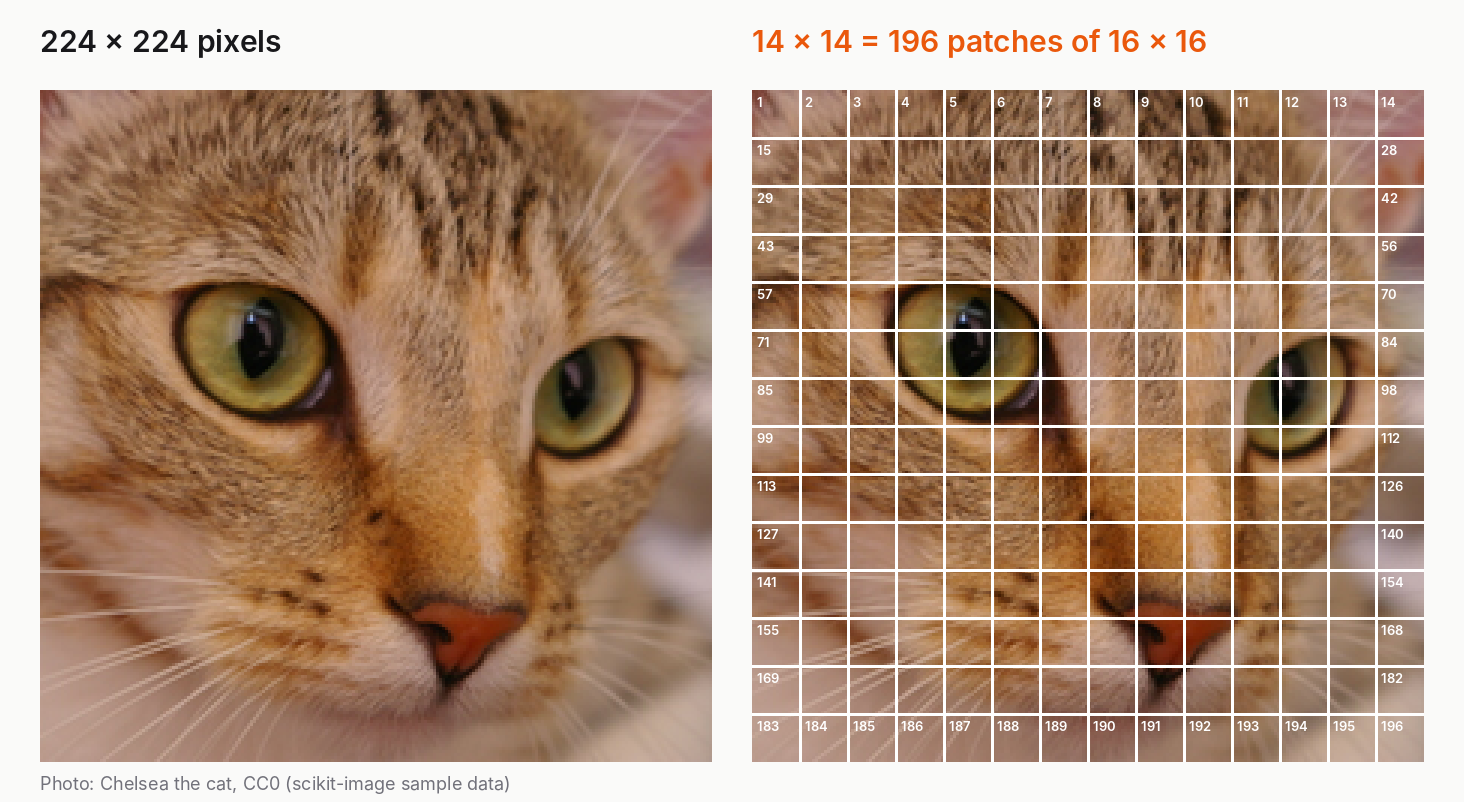 A 224×224 cat photo next to the same photo cut into a 14×14 grid of 16×16-pixel patches, numbered 1 to 196A 224 × 224 image cut into 16 × 16 squares gives a 14 × 14 grid, so 196 patches. Photo: Chelsea the cat, CC0, from the scikit-image sample data.
That's the whole idea in the paper's title. Each 16 × 16 patch is one "word", and the image becomes a sentence of 196 of them.
![A sentence shown as word tokens, and below it the image shown as a row of patch tokens starting with a [CLS] token](https://kpvazbolmw6xzctu.public.blob.vercel-storage.com/blog/13ef12bd-69a3-41b8-aaac-107f9b382b65.png) A sentence shown as word tokens, and below it the image shown as a row of patch tokens starting with a [CLS] tokenThe patches are read in a fixed order, left to right, top to bottom, like reading a page:
A sentence shown as word tokens, and below it the image shown as a row of patch tokens starting with a [CLS] tokenThe patches are read in a fixed order, left to right, top to bottom, like reading a page:
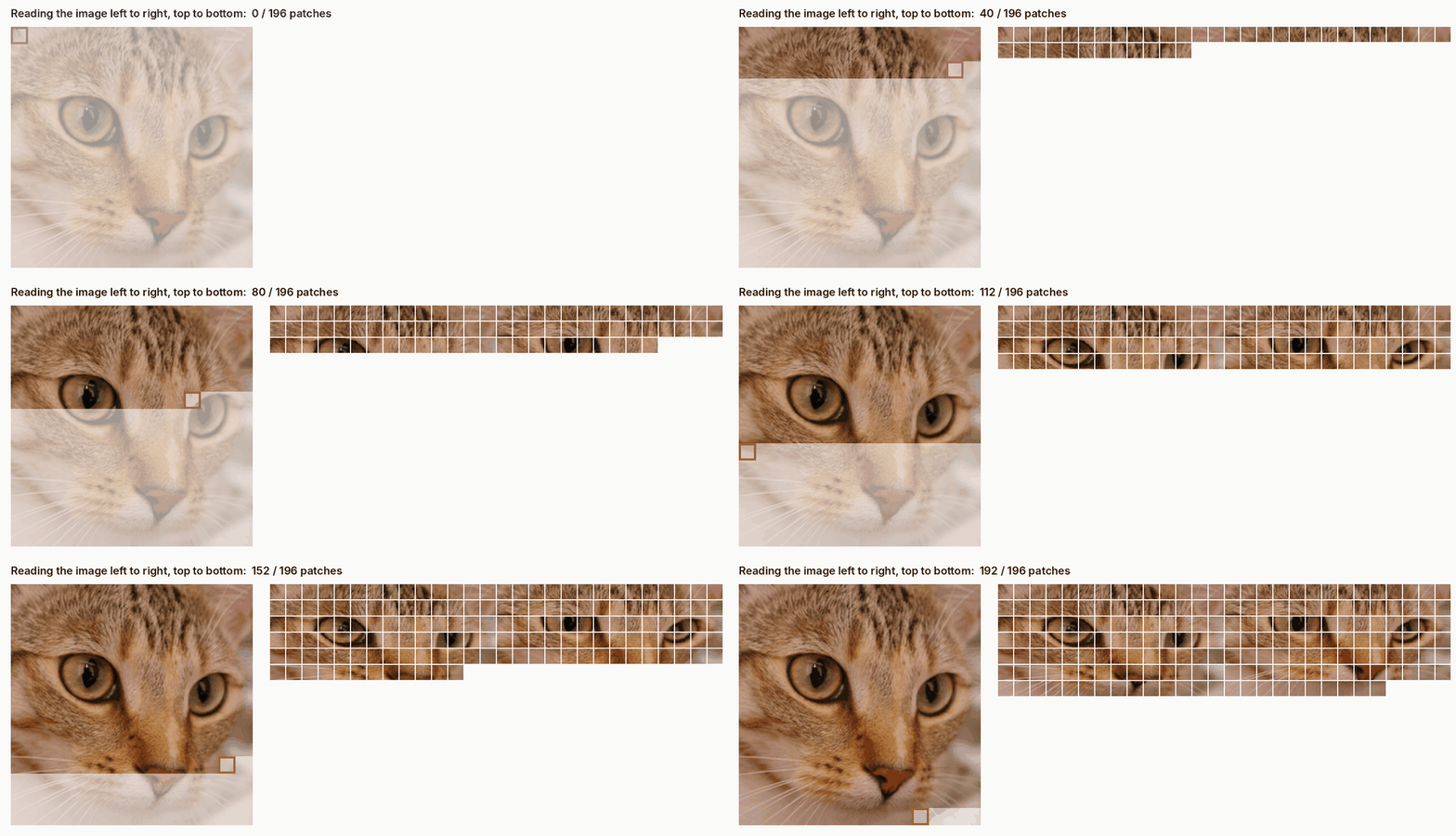 Animation: the cat image is read patch by patch, and each patch joins a growing row of tokensNow look at the numbers again:
pixels as tokens:   50,176 tokens → ≈ 2.5 billion attention pairs
patches as tokens:     197 tokens → 38,809 attention pairs
That's about 65,000 times less attention work, for the same image. Suddenly a plain transformer can afford it.
3. What happens to each patch on the way in
A patch is 16 × 16 pixels with 3 colours each, so it's a list of 16 × 16 × 3 = 768 numbers. The model does three small things before the transformer sees it.
Step 1: flatten and project. Each patch's 768 numbers are multiplied by a learned matrix, which turns them into a vector of a fixed size. This is the image version of a word embedding: a list of numbers that represents the token. (Fun coincidence: in ViT-Base, the smallest model in the paper, that vector also has 768 numbers.)
Step 2: add a [CLS] token. One extra learnable token is put at the front of the sequence. The paper borrowed the idea from BERT's [class] token. By the end of the network, this token has gathered a summary of the whole image, and the final answer ("cat") is read from it.
Step 3: add position embeddings. Here's a subtle one. Once the patches are in a row, the model has no idea that patch 15 sits directly below patch 1. So each position gets its own learned vector, added to the patch.
The authors used plain 1D positions, just "1st, 2nd, 3rd…", and let the model figure out the 2D layout itself. And it did. When they looked at the learned position embeddings, patches in the same row or column had similar embeddings. Nobody told it the image was a grid. It learned it.
Then it's an ordinary transformer, the same kind used for text.
4. The code: a cat becomes 196 tokens
Concrete first, abstract second. Here's step 1 in real Python. The second half is something we'll need in section 6, so keep it in mind.
import math
import numpy as np
from PIL import Image
from skimage import data

# ---------- 1. An image becomes a "sentence" of patches (ViT, 2020) ----------
img = data.chelsea()[:, 75:375]                 # 300 x 300 crop of a CC0 cat photo
img = np.asarray(Image.fromarray(img).resize((224, 224)))
P = 16                                          # patch size from the ViT paper title
H, W, C = img.shape
patches = (img.reshape(H // P, P, W // P, P, C)
              .swapaxes(1, 2)
              .reshape(-1, P * P * C))          # one row per patch
print("image:", img.shape)
print("patches:", patches.shape, "-> N =", H * W // P**2, "tokens (+1 [CLS] = 197)")
print("numbers per patch:", P * P * C)

# ---------- 2. What an image costs Claude (formula + reference code from the docs) ----------
def count_image_tokens(width, height):
    return math.ceil(width / 28) * math.ceil(height / 28)

def resized_size(width, height, max_edge=1568, max_tokens=1568):
    def fits(w, h):
        return (math.ceil(w / 28) * 28 <= max_edge and math.ceil(h / 28) * 28 <= max_edge
                and count_image_tokens(w, h) <= max_tokens)
    if fits(width, height):
        return (width, height)
    if height > width:
        rh, rw = resized_size(height, width, max_edge, max_tokens)
        return (rw, rh)
    ar, lo, hi = width / height, 1, width
    while lo + 1 < hi:
        mid = (lo + hi) // 2
        if fits(mid, max(round(mid / ar), 1)):
            lo = mid
        else:
            hi = mid
    return (lo, max(round(lo / ar), 1))

print(f"\n{'image':>11} | {'standard tier':>22} | {'high-res tier':>22}")
for w, h in [(500, 500), (1000, 1000), (2000, 2000), (1920, 1080), (3840, 2160), (1170, 2532)]:
    s = resized_size(w, h)
    r = resized_size(w, h, 2576, 4784)
    print(f"{w:>5}x{h:<5} | {s[0]:>4}x{s[1]:<4} {count_image_tokens(*s):>5} tok | "
          f"{r[0]:>4}x{r[1]:<4} {count_image_tokens(*r):>5} tok")
The whole "image to words" step is the one reshape → swapaxes → reshape line. It cuts the image into a 14 × 14 grid, then lays the 196 squares out in a row, 768 numbers each.
Here's the first part of the output:
image: (224, 224, 3)
patches: (196, 768) -> N = 196 tokens (+1 [CLS] = 197)
numbers per patch: 768
196 rows, one per patch. That table is the sentence the transformer reads.
5. Did it work? What the paper actually found
The paper is An Image is Worth 16x16 Words: Transformers for Image Recognition at Scale by Alexey Dosovitskiy and colleagues at Google, published at ICLR 2021. They called the model the Vision Transformer, or ViT.
They trained three sizes:
| Model | Layers | Vector size | Parameters |
|---|---|---|---|
| ViT-Base | 12 | 768 | 86M |
| ViT-Large | 24 | 1,024 | 307M |
| ViT-Huge | 32 | 1,280 | 632M |
The headline result is that their biggest model (ViT-H/14, which uses 14 × 14 patches) reached 88.55% accuracy on ImageNet, matching or beating the best CNNs of the time. It also took far less compute to pre-train, measured in TPUv3-core-days (one Google TPU chip core running for one day):
ViT-H/14:        2.5k TPUv3-core-days
BiT-L (CNN):     9.9k
Noisy Student:  12.3k
But here's the part most summaries skip. That model was first trained on JFT-300M, a Google-internal dataset of 303 million images.
When they trained only on ImageNet (about 1.3 million images), ViT came out "a few percentage points below ResNets of comparable size". A ResNet is a popular CNN.
Why? A CNN comes with built-in assumptions about images, which researchers call inductive biases. The two big ones are that nearby pixels belong together (locality), and that a cat is still a cat if it moves a little to the left (translation equivariance). A transformer has neither. It has to learn them from data.
With a little data, the built-in assumptions win. With a lot of data, the transformer learns them and then some. The paper's own summary is: "large scale training trumps inductive bias."
6. The same idea in your chat window: what one image costs
Now let's bring this back to the screenshot you dropped into a chat this morning.
Claude's official vision docs describe images the same way. They say Claude "processes images in patches instead of pixels", where each patch is a 28 × 28-pixel block, called a visual token. The cost of an image is:
visual tokens = ⌈width / 28⌉ × ⌈height / 28⌉
(The ⌈ ⌉ brackets mean "round up", since a half patch still costs a whole one.) To be clear, the docs describe the patch counting, not the model's internal design, so I'm not claiming this is ViT. But the family resemblance is obvious.
Let's do one by hand. A 1000 × 1000 photo:
⌈1000 / 28⌉ = 36 patches across
36 × 36     = 1,296 visual tokens
That matches the docs' table exactly.
There's also a cap. Each model has a maximum, and anything bigger gets shrunk first, keeping its shape. The docs list two tiers:
| Tier | Models | Max long edge | Max visual tokens |
|---|---|---|---|
| Standard | most models | 1,568 px | 1,568 |
| High-resolution | Claude 4.7 and later | 2,576 px | 4,784 |
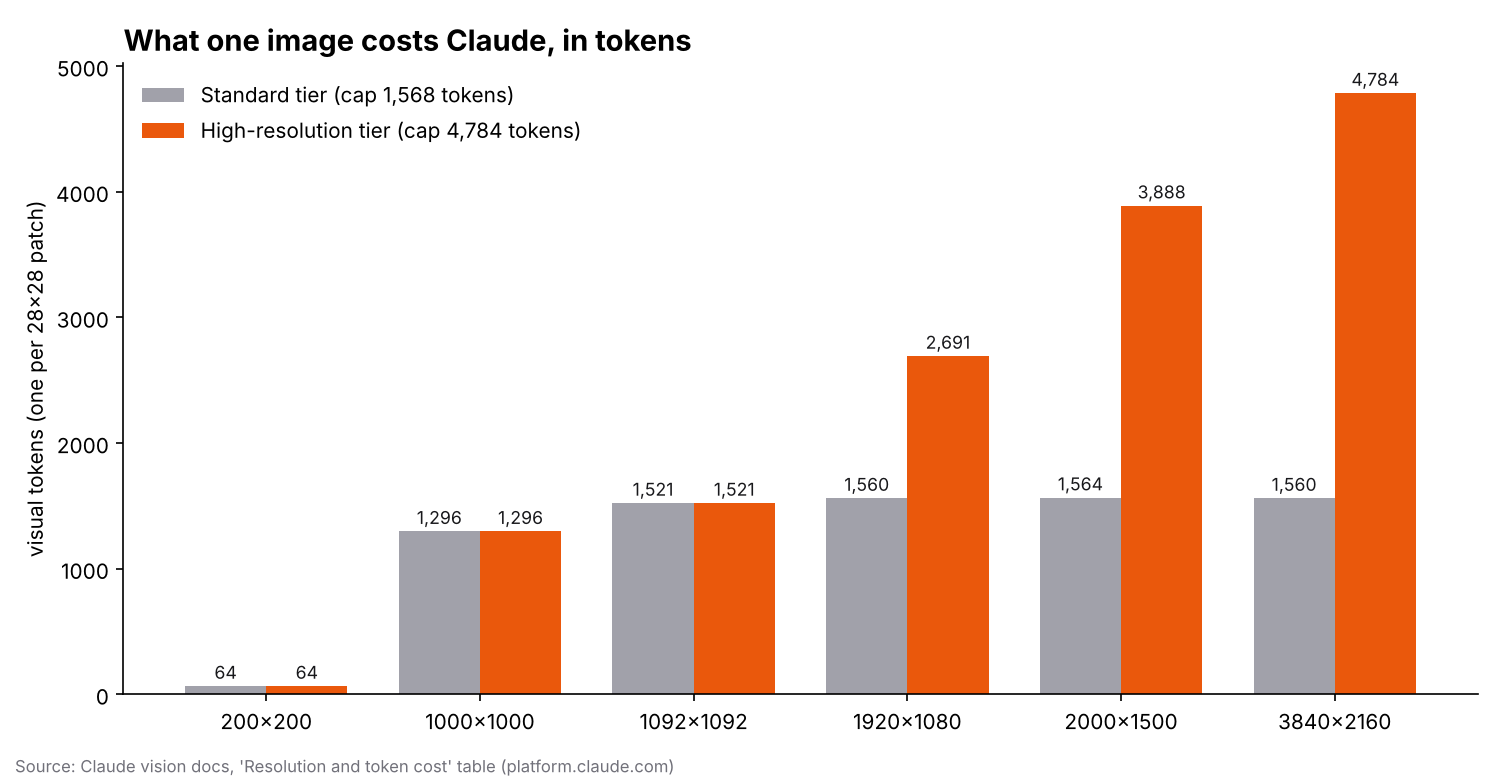 Bar chart of visual-token cost for six image sizes on the standard and high-resolution tiers. Standard flattens at about 1,560 tokens; high-resolution climbs to 4,784 for a 4K imageThe second half of the script uses the docs' own reference code for the resize rule. Here's what it prints:
      image |          standard tier |          high-res tier
  500x500   |  500x500    324 tok |  500x500    324 tok
 1000x1000  | 1000x1000  1296 tok | 1000x1000  1296 tok
 2000x2000  | 1092x1092  1521 tok | 1932x1932  4761 tok
 1920x1080  | 1456x819   1560 tok | 1920x1080  2691 tok
 3840x2160  | 1456x819   1560 tok | 2576x1449  4784 tok
 1170x2532  |  725x1568  1456 tok | 1170x2532  3822 tok
The last row is a tall phone screenshot. Notice that on the standard tier, the long edge (1,568 px) is the limit, not the token budget. The docs point out that for most photos and screenshots it's the other way around: the token budget decides the final size.
7. ⚠️ The trap that catches everyone
Here's the trap. People assume that sending a bigger, sharper screenshot means the model sees more detail.
Up to the cap, cost grows with the area. Double the width and the height and you pay about four times the tokens. Look at the table:
 500 × 500   →   324 tokens
1000 × 1000  → 1,296 tokens   (2× the sides, 4× the tokens)
Past the cap, it flips. The model shrinks your image to fit, quietly. A 4K screenshot (3840 × 2160) is seen as 1456 × 819 on the standard tier. That's about 38% of the width.
And small text is the first thing to go. I made a 4K screenshot with 15-pixel text, a normal size for a desktop app, shrank it to each tier's size with the docs' rule, then zoomed in on the same spot:
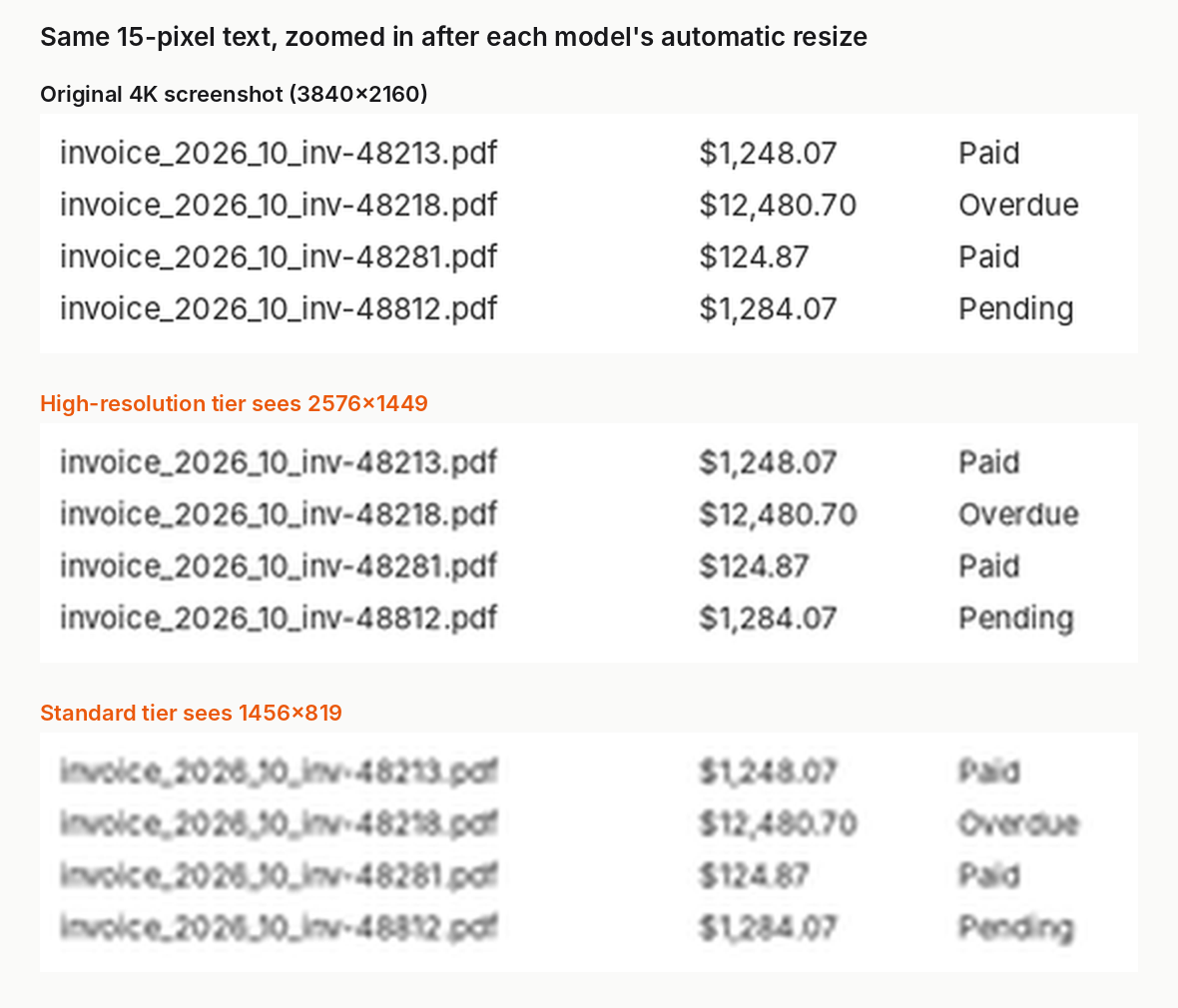 Three zoomed crops of the same invoice table: sharp in the 4K original, still readable at the high-resolution tier, and blurry with hard-to-read digits at the standard tierThe resizing here is my simulation with Pillow's resampling, using the target sizes from the docs. The model's own resizing may differ in detail, but the size it ends up at is the same.
Look at the bottom panel. Is that $1,248.07 or $1,243.07? Is that invoice 48213 or 48218? On the standard tier you sent a 4K image, paid the full capped price, and got a blurry read of exactly the part you cared about.
The fix is simple: crop before you send. If you only care about that invoice table, cut out a region around it, roughly 1456 × 819 pixels of the original. It fits under the cap, so it isn't shrunk at all, and the text arrives sharp at about the same token cost.
Three rules worth keeping:
- Crop to what matters. The model can't zoom into pixels it never received.
- Know your tier. The same 4K screenshot costs 1,560 tokens on one tier and 4,784 on the other.
- Resize it yourself if you need coordinates. If you ask for the position of a button, the model answers in the resized image's pixels. The docs'
resized_sizecode tells you the exact size, so you can map positions back.
8. Let's be honest about what just happened…
We didn't train a Vision Transformer today. Training ViT-H/14 took thousands of TPU-core-days and hundreds of millions of images. We rebuilt its first step, the part that turns a picture into words.
But that first step is the idea worth keeping:
- Anything can be a sentence. Cut it into pieces, give each piece a vector and a position, and a transformer can read it. Images were the first big proof.
- The model learns the structure. ViT was never told that images are 2D grids. Its position embeddings worked out rows and columns on their own.
- Scale beats assumptions, but only with scale. On 1.3 million images, the CNN's built-in knowledge wins. On 303 million, the transformer wins.
- Your images are tokens too, and they have a price. ⌈w/28⌉ × ⌈h/28⌉, up to a cap, after which detail is quietly thrown away.
If you want to feel this yourself, take a screenshot of your own screen, run it through resized_size, shrink it to that size and look at it at 100%. That's what you're actually sending.
What's next
Next week we're back in From Shannon to Transformers with Part 3. Our n-gram model gave a probability of exactly zero to almost half of the text it hadn't seen, and we'll fix it with an idea from Alan Turing's wartime codebreaking work. Spoiler: it starts with counting the things you've seen exactly once.
Sources:
A. Dosovitskiy, L. Beyer, A. Kolesnikov, D. Weissenborn, X. Zhai, T. Unterthiner, M. Dehghani, M. Minderer, G. Heigold, S. Gelly, J. Uszkoreit and N. Houlsby, "An Image is Worth 16x16 Words: Transformers for Image Recognition at Scale," ICLR 2021, arXiv:2010.11929.
Anthropic, "Vision" (Resolution and token cost) and "Coordinates and bounding boxes" (How Claude resizes and pads images), Claude platform docs, accessed October 2026. The resized_size function is adapted from the reference implementation there.
Photo: "Chelsea the cat", scikit-image sample data, CC0 (Stefan van der Walt). The program outputs in this post come from running the code above. The figures and the animation were made with a separate Python script from the same photo.
📬 If you like this kind of "raw stuff nobody explains properly", subscribe to the newsletter. The next post lands in your inbox first, along with the code.
Reading progress
0% read
Auto-completes after you reach the end and linger for a moment.
You made it to the end
One useful email when there is something worth sharing.
New dissections, build logs, courses and tool releases. Double opt-in, unsubscribe at any time.
Subscribe to Letters
Name is optional. Email is all it takes.