Part 2: Async Primitives, Standard I/O, and python environment
Hey, welcome back. In Part 1, we covered the theory. Now, you’re probably itching to start writing Python files and connecting them to Claude or Cursor.
But here is the truth: if you try to build an MCP server without understanding asynchronous programming, standard input/output streams, or python environment isolation, your code will crash, it will hang silently, and you won't have a clue how to fix it.
In this part, we are going to focus entirely on the fundamentals. We'll cover Python environment setup, asynchronous programming, standard I/O redirection, and how JSON-RPC packets travel across standard streams. If any of these concepts are new to you, pause and click the attached links to read up.
Let's build a foundation you can actually stand on.
1. The Setup: Python, Pip, and Virtual Environments
Before writing a single line of code, we need a clean, predictable workspace.
1.1. Python and Pip
Python is our runtime interpreter. pip is Python's default package manager. It connects to the Python Package Index (PyPI) to download libraries like mcp or openai.
- Learn more: Official Python Installation Guide
- Learn more: Pip Package Manager Documentation
1.2. Why Virtual Environments venv are essentials
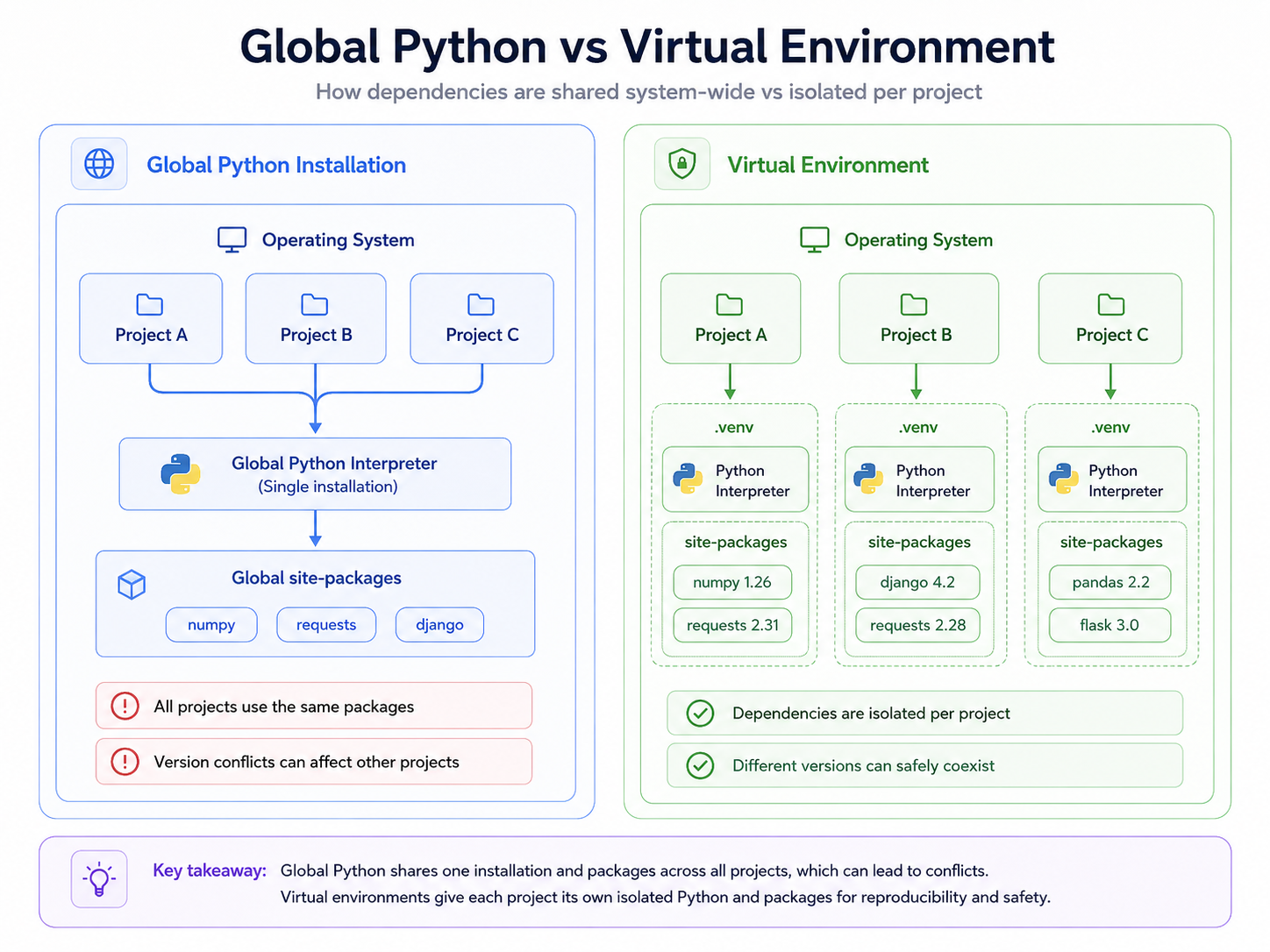 If you install libraries globally on your machine
 pip install mcp, they end up in your system's global Python folder. The moment you work on a second project that requires a different version of the same library, your global environment breaks.
A virtual environment venv is a self-contained directory containing its own Python interpreter and its own isolated set of installed packages.
To create and activate a virtual environment, open your terminal and run:
bash

# Create a virtual environment named 'venv'

python -m venv venv

# Activate it (Windows PowerShell)

.\venv\Scripts\Activate.ps1

# Activate it (Mac/Linux)

source venv/bin/activate
Once activated, any package you install using pip stays locked inside this project directory.
2. You need to understand Async: asyncio and async with
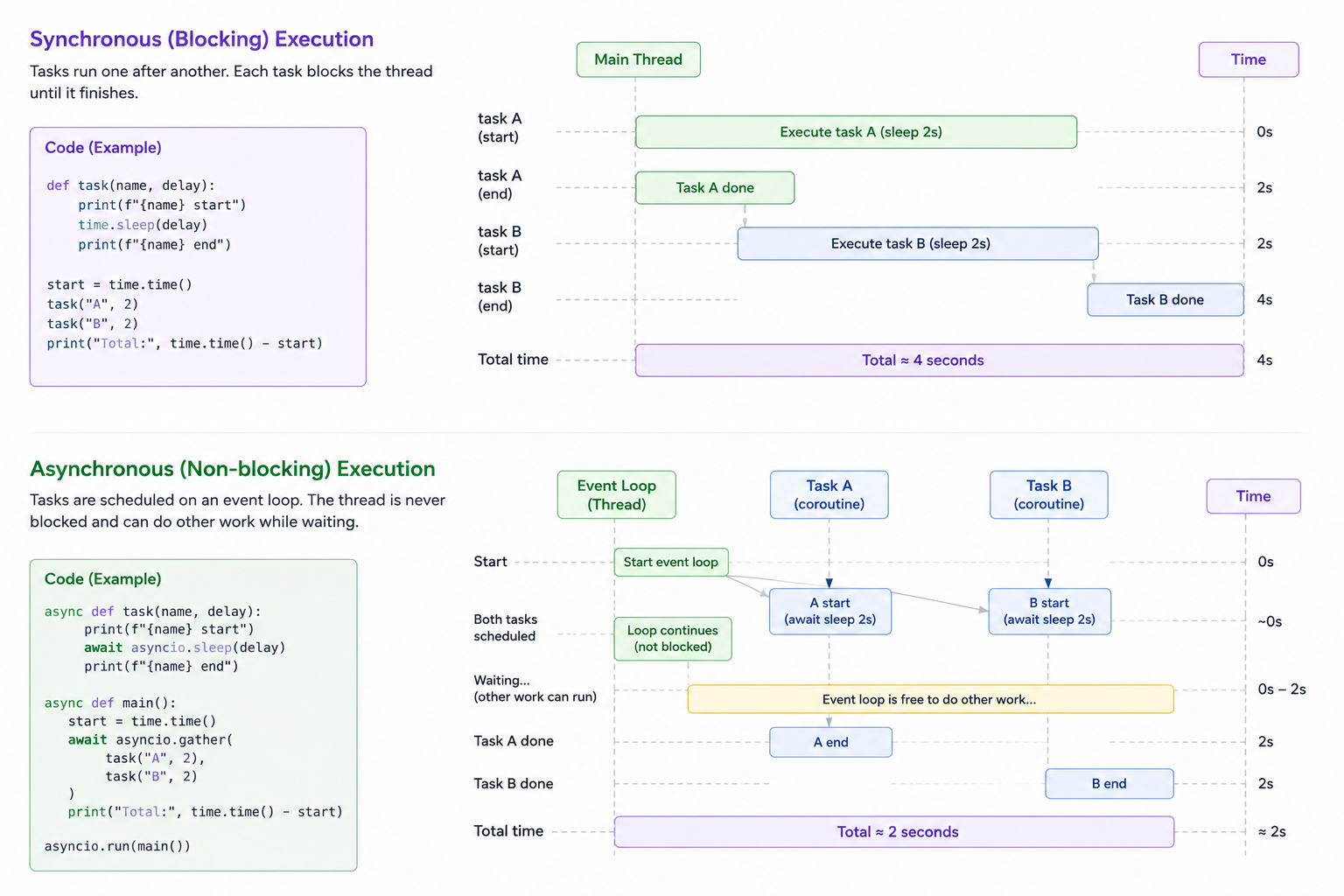
MCP is built around real-time concurrency. The server has to listen for incoming tools requests, read files, execute shell commands, and stream progress notifications to the client—all at the same time. If you write synchronous (blocking) code, your server will freeze the entire host client while waiting for a single slow tool to complete.
 ### 2.1. Concurrency with
 asyncio
In Python, we achieve concurrency using async def to declare coroutines and await to yield control back to the event loop.
import asyncio

async def fetch_data():

    print("Start fetching...")

    await asyncio.sleep(2)  # Non-blocking pause

    print("Done fetching!")

    return {"data": 123}
If you call fetch_data(), it doesn't run immediately. It returns a coroutine object. You must await it inside an active event loop.
2.2. Asynchronous Context Managers async with
When dealing with processes, files, or network sockets, you must ensure they are properly initialized and closed, even if your code crashes. Context managers handle this setup and teardown lifecycle automatically.
For asynchronous resources, we use async with:
# The context manager ensures the connection closes safely when the block exits

async with httpx.AsyncClient() as client:

    response = await client.get("https://api.github.com")

    print(response.status_code)
- Learn more: [Python Contextlib & Resource Management](https://docs.python.org/3/library/contextlib.html)
3. Standard I/O (stdio) and the JSON-RPC protocol
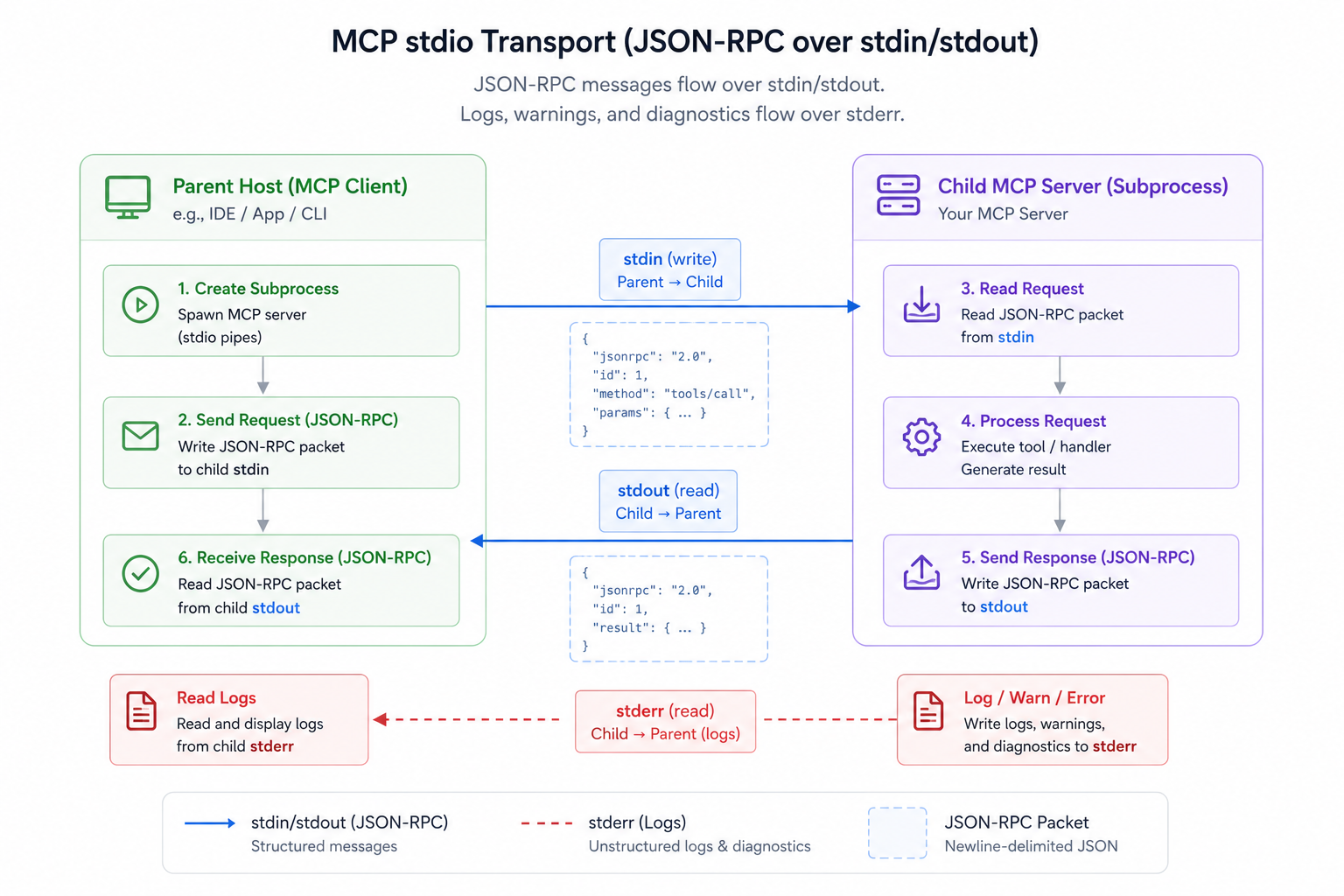
The most common way a host (like Claude Desktop) connects to a local MCP server is over the stdio transport. Under the hood, this is just basic operating system process communication.
3.1. Standard Streams: Stdin, Stdout, and Stderr
Every process you launch gets three standard channels:
1. sys.stdin (Standard Input): Receives data sent to the process.
2. sys.stdout (Standard Output): Writes normal output data.
3. sys.stderr (Standard Error): Writes logs and error messages.
When Cursor or Claude launches your MCP server, it spawns it as a subprocess. The client writes JSON-RPC request packets directly to the server's stdin, and reads the server's responses directly from the server's stdout.
 - Learn more: Python sys Stream Course
3.2. How JSON-RPC Packets Travel
Here is a raw look at what travels across those streams. When the client wants to list tools, it writes this string to your server's stdin:
{"jsonrpc": "2.0", "id": 1, "method": "tools/list", "params": {}}
Your server reads this from stdin, runs the internal routing handler, and writes the response back to stdout:
{

  "jsonrpc": "2.0",
  "id": 1,
  "result": {
    "tools": [
      {
        "name": "read_file",
        "description": "Read the contents of a file",
        "inputSchema": {
          "type": "object",
          "properties": {"path": {"type": "string"}}
        }
      }
    ]
}
- Learn more: Official JSON-RPC 2.0 Specification
3.3. The Stderr Rule (Be careful here)
Because stdout is the dedicated channel for sending JSON-RPC responses, you must never print normal text to stdout.
If your code contains print("Server started!") or logging.info("Calling tool..."), those plain-text strings are written directly to stdout. The client tries to parse "Server started!" as a valid JSON-RPC message, fails, and immediately terminates the connection.
WARNING
**Rule of Standard Streams: In an MCP stdio server,stdoutbelongs strictly to the JSON-RPC protocol. All debugging logs, error messages, and startup notices MUST be redirected tosys.stderr.
Wrapping Up Part 2
We have laid the foundation:
1. We set up a virtual environment venv) to isolate our libraries.
2. We learned to think asynchronously with asyncio and manage resource lifecycles with async with.
3. We mapped out how standard streams work, how JSON-RPC packets look under the hood, and why debugging output must go to stderr.
You now have the technical vocabulary and understanding of the Python async primitives. In Part 3, we will start writing the actual server code, defining custom tools, managing read-only resources, and routing prompt templates. See you in the next post! Please consider subscription to my newsletter and join 5k+ subscribers who are reading and building with me.
Reading progress
0% read
Auto-completes after you reach the end and linger for a moment.
You made it to the end
Get more like this in your inbox
Every week I write about machine learning, engineering patterns, and things I'm building. Practical, no fluff — straight to your inbox.
Subscribe to the newsletter
Get thoughtful updates on AI, engineering, and product work.