MCP Server (Part 1)
Hey, welcome to this blog. Glad you care about MCP servers and want to build your own without vibe code but with clear understanding what's going on with MCP. I will not waste your a sec. Trust me. At the end you will end up with a production ready MCP server with a confidence and a project to showcase in your resume.
In this post:
- Why MCP exists and what problem it solves
- Core features of MCP
- The architecture: Host, Client & Server
- Transport layer: stdio vs Streamable HTTP(Modern) vs deprecated HTTP/SSE
- The three primitives: Tools, Resources, and Prompts
- JSON-RPC 2.0: The protocol underneath
- The initialization handshake: what happens before any tool is called
So, tighten your seatbelt, its going to be a really long journey. In this part I am focusing on theory part mostly, so zero code here, that comes in Part 2. Let's cover all the topics mentioned above.
1. Why MCP exists and what problem it solves?
Picture the state of AI tooling before MCP. Every team building an AI product was writing its own code for tools to glue them in their codebase. Suppose I want Claude to read files then I have to write my custom integration, I want to query my database, I need to write another one. And suppose I want to do this same with GPT-5, then I need to start over again. You get the idea, how messy it was before:
- N models X M tools = N*M custom integrations
- There was no standard interface, no reusability, no portability
- Integrations used to break when models were updated
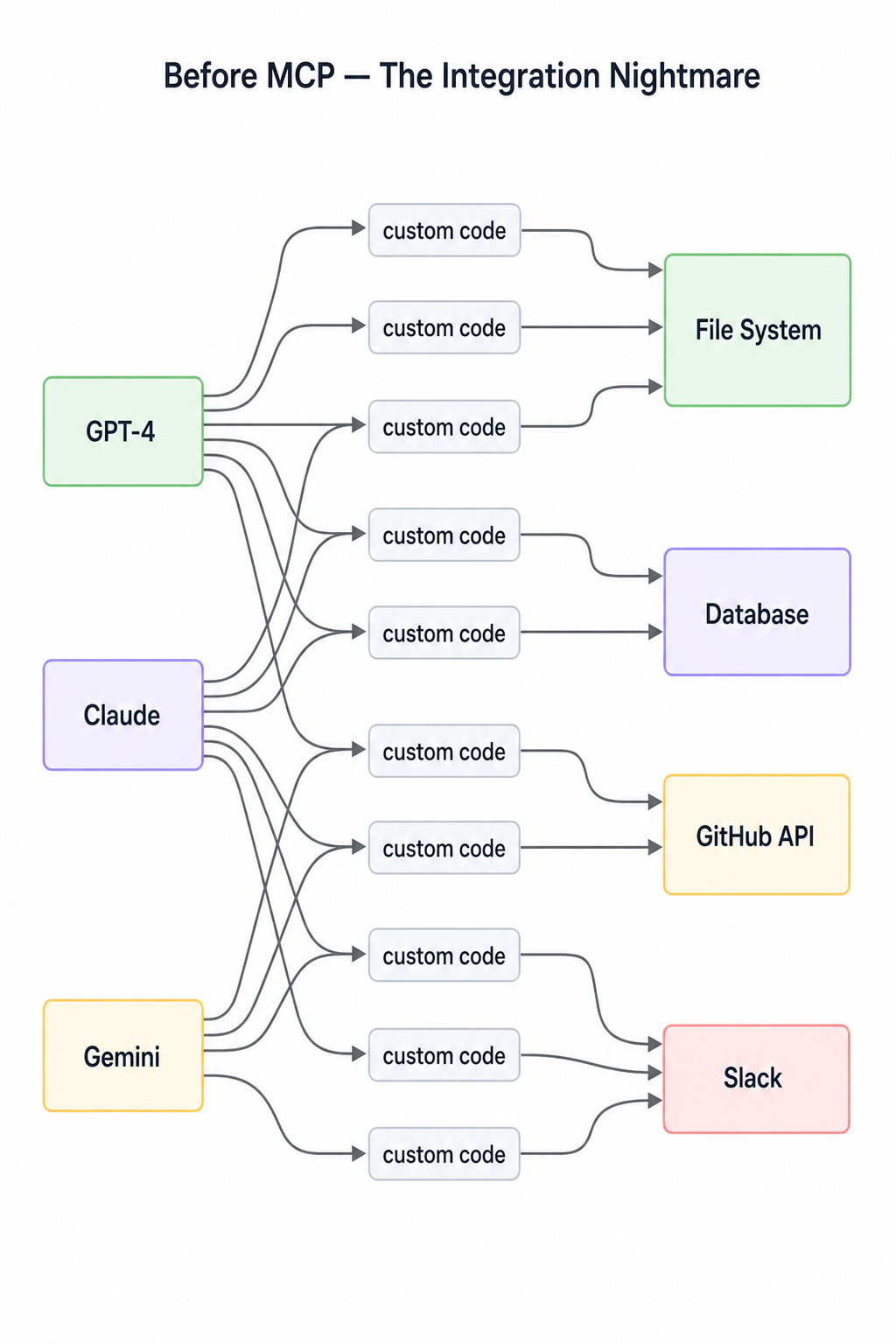 NM3 models × 4 tools = 12 custom integrations. Add one new model or one new tool and the matrix grows again. Did you get the pain?
Model Context Protocol(MCP) solves this with a single, open standard. The idea is simple, write a tool once as an MCP server then any MCP-compatible model or host can use it without touching server code again.
The mess becomes this:
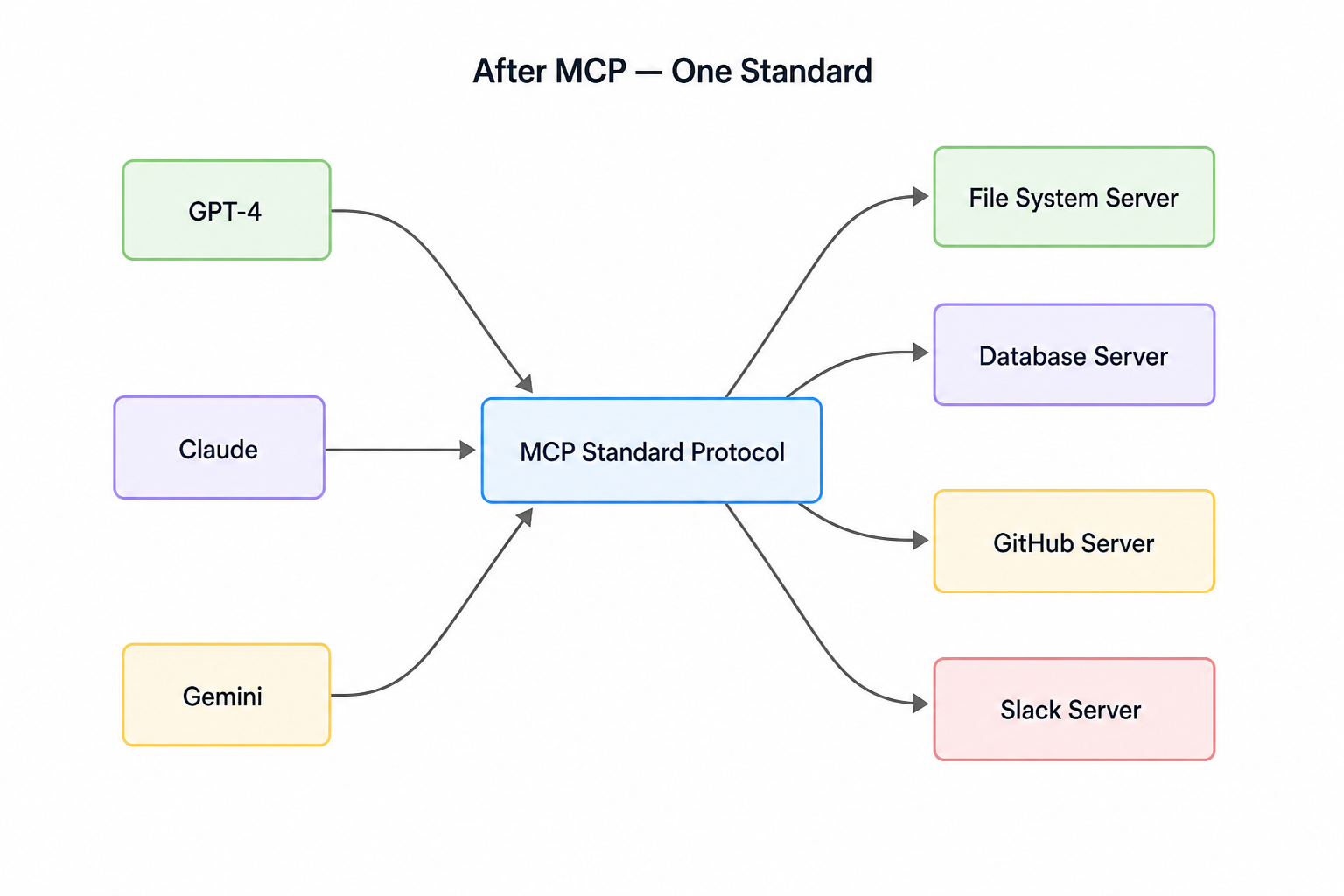 N + M integrationsNow N models + M tools = N + M integrations. That's the entire value proposition in one diagram.
2. The architecture: Host, Client & Server
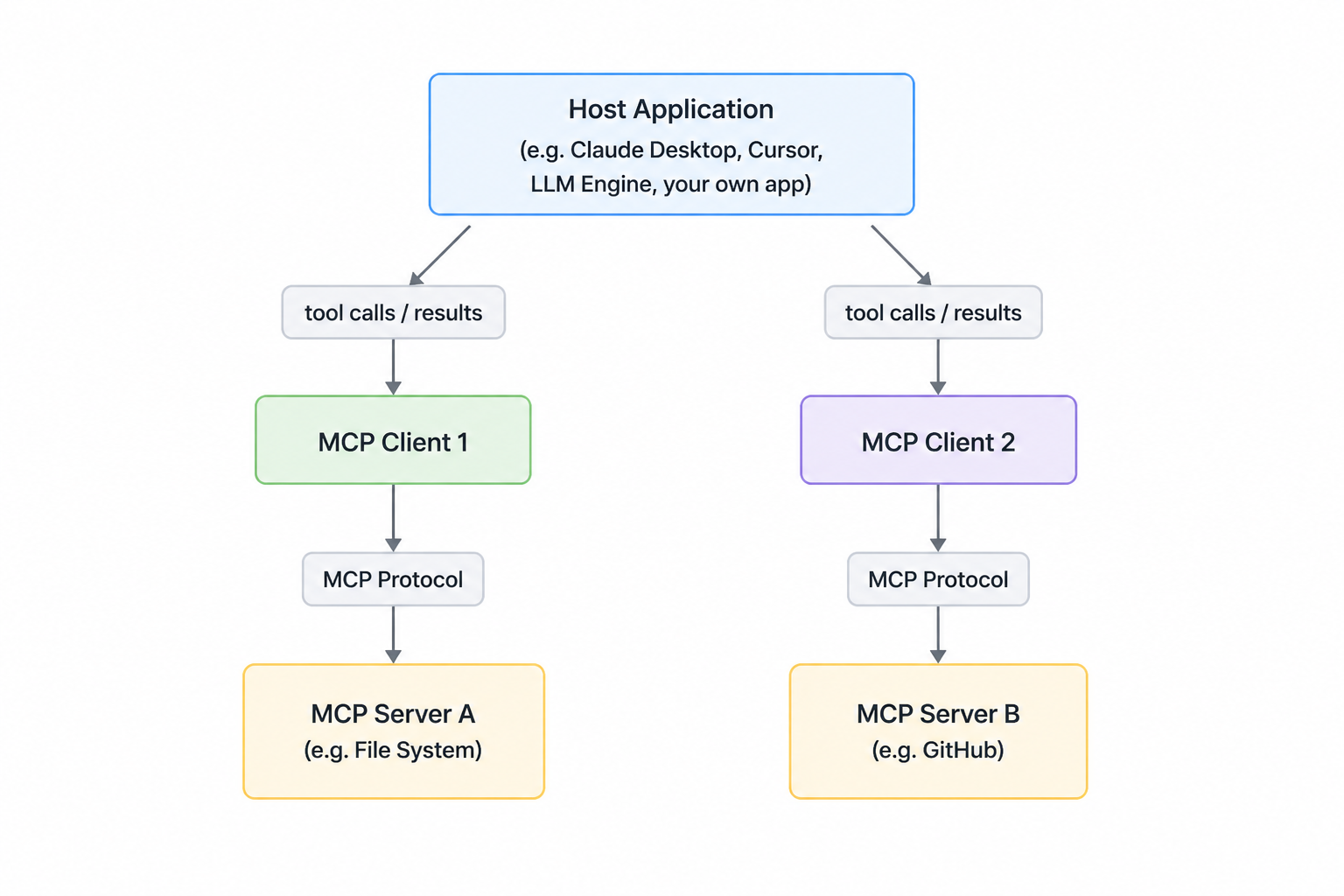 The architecture: Host, Client & ServerMCP has three distinct roles. They play together and complete the communication loop. Read this carefully.
Host: The application the user runs. Claude Desktop is a host. Cursor is a host. However, a custom Python application can also serve as a fully independent host. The host manages the primary LLM orchestration layer and decides which MCP servers to connect to. In a custom setup (like the one we will build in part 2), the host entirely wraps the chat loop and standard input processing via an internal client infrastructure to orchestrate a proprietary user experience.
Client: Lives inside the host. One client per server connection is written. It manages the lifecycle of that connection such as opening, handshaking, sending requests. User never sees the client directly.
Server: This is what we will build. It is an independent process that exposes tools, resources and prompts over the MCP protocol. It knows nothing about the LLM. It doesn't talk to Claude directly. It responds to the requests from the client.
Critical point: MCP server talks to the client not to the Claude directly. The client acts as the translator between the LLM's intentions and the server's capabilities. This separation is intentional. It means our server is reusable across any host. Write it once, and connect it anywhere.
Now, a question comes to your mind right? Like how the client and the server communicates with each other? You will be glad that the protocol is the same as a normal frontend will talk to the backend server. But here the protocols options and rules are very different. Let's discuss the rule in which client and the server talk to each other.
3. Transport layer: stdio vs Streamable HTTP(Modern) vs deprecated HTTP/SSE
Two transports are currently supported by MCP. They're not interchangeable means each fits a different deployment scenario.
- stdio (Standard Input/Output)
- Streamable HTTP (modern)
- HTTP + SSE (Deprecated)
3.1. stdio
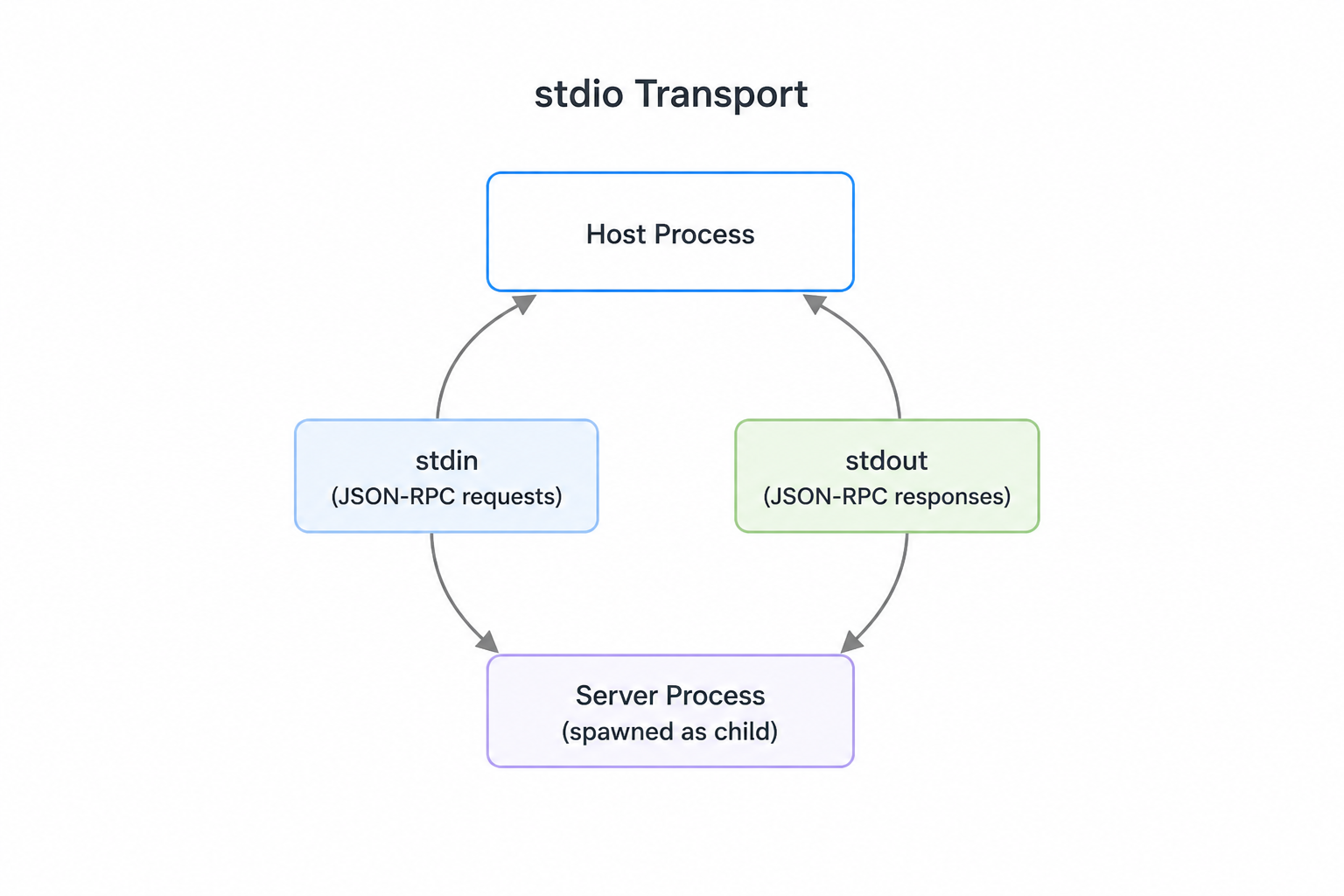 stdio transportWhen we're first developing an MCP server or client, the most commonly used transport is the stdio transport. This approach is straightforward: the client launches the MCP server as a subprocess and communicates through standard input and output streams.
Here's how it works:
- Client sends messages to the server using the server's
stdin - Server responds by writing to
stdout - Either the server or client can send a message at any time
- Only works when client and server run on the same machine
We can actually test an MCP server directly from the terminal without writing a separate client. When we will be running a server with python run server.py, it will listen to stdin and writes responses to stdout. This means we will be pasting JSON messages directly into the terminal and see the server's responses immediately. The terminal output shows the complete message exchange, including example messages for initialization and tool calls.
Now within the stdio transport, there are four communication patterns you need to handle:
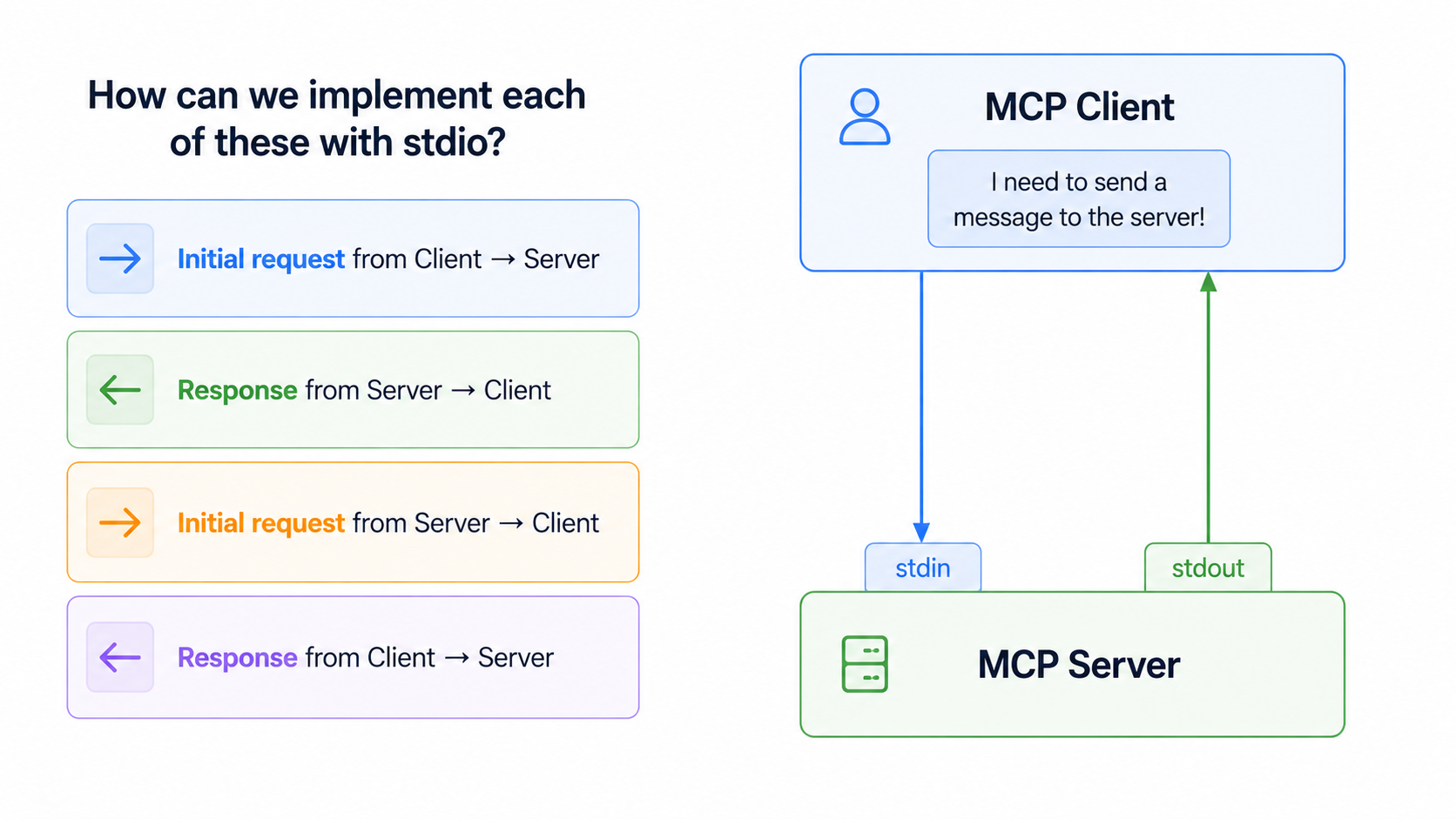 Four communication patternsEither party can initiate communication at any time using just these two channels. That bidirectionality is what makes
 stdio the ideal transport. When we move to HTTP/SSE in production, we'll hit limitations on which direction messages can flow. stdio is our baseline for understanding full MCP implementation before going to live.
But it has a tradeoff: tightly coupled to the host machine. Not suitable for remote servers or multi-client scenes.
3.2 Streamable HTTP (The Modern Standard)
Streamable HTTP is the modern standard for connecting MCP clients to remote servers. Under this transport, the server operates as an independent process that can handle multiple client connections over a single HTTP endpoint:
- MCP Endpoint: The server exposes a single HTTP endpoint (the MCP endpoint, e.g.,
/mcp) that accepts HTTPPOSTrequests. - Post-Only Requests: Every JSON-RPC request or notification sent from the client is a new HTTP
POSTrequest. - Flexible Response Handling: The server responds to each request using either:
- A single JSON object (
Content-Type: application/json) - A short-lived Server-Sent Events (SSE) stream (
Content-Type: text/event-stream) carrying request-related notifications (such as progress indicators) followed by the final JSON response. The stream terminates as soon as the response is delivered.
- A single JSON object (
Server-to-Client Requests (MRTR): To fetch directories or invoke sampling from the client, the server does not push standalone requests. Instead, it uses Multi Round-Trip Requests (MRTR) (under specification SEP-2322) [MRTR](https://modelcontextprotocol.io/seps/2322-MRTR). The server returns an InputRequiredResult containing sub-requests, and the client retries the original request, passing the gathered inputs in inputResponses.
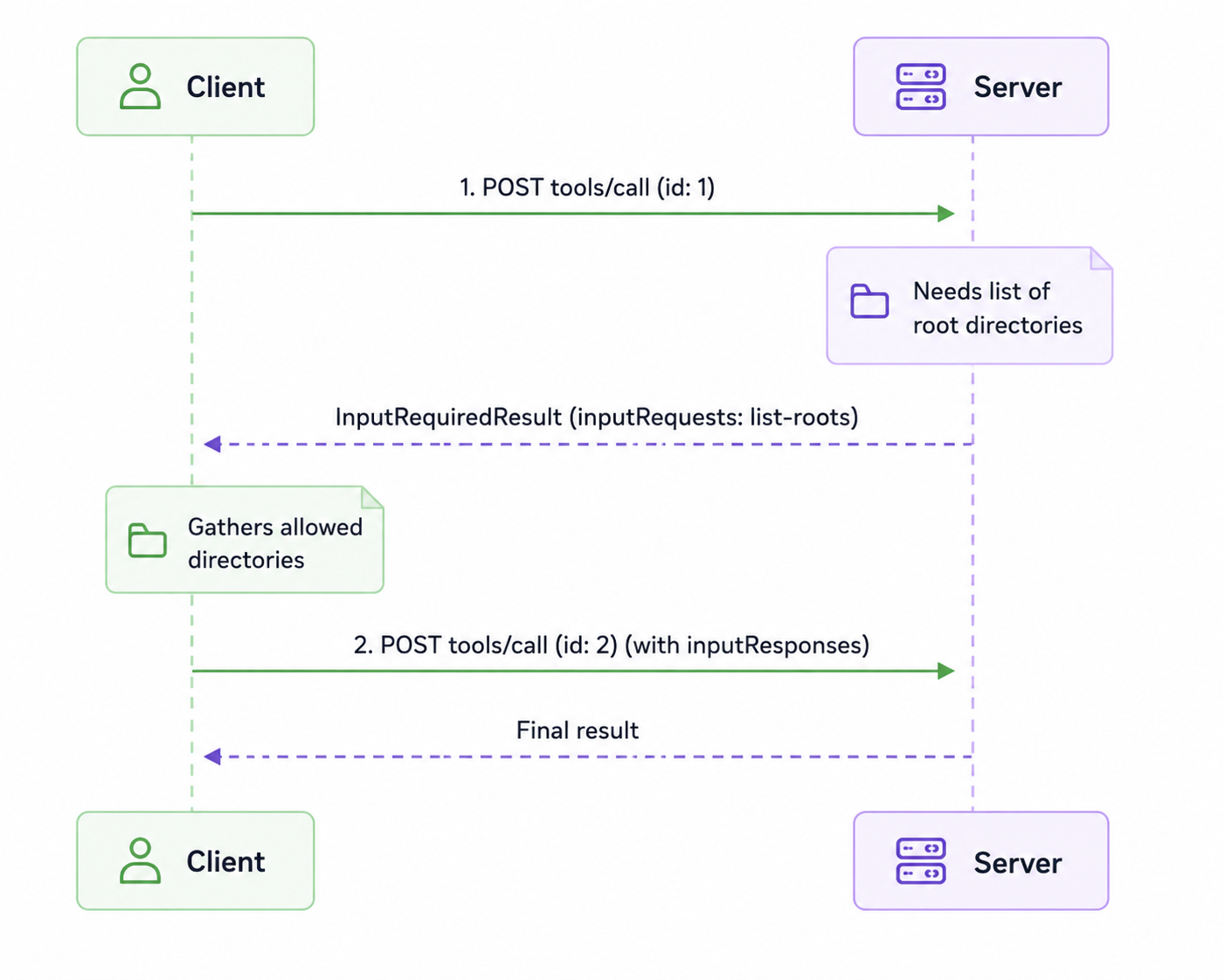 Request Metadata Headers
Conforming clients must mirror selected JSON-RPC body fields into HTTP headers to let reverse proxies, API gateways, or load balancers inspect and route requests without parsing the JSON body:
MCP-Protocol-Version: The version of the protocol being used (e.g.2026-07-28).Mcp-Method: The JSON-RPC method name (e.g.,tools/call).Mcp-Name: The tool or resource name (e.g.read_file).Mcp-Param-{Name}: Custom parameter headers. If a value contains non-ASCII characters, it is safely encoded using a Base64 sentinel format (e.g.,=?base64?{EncodedValue}?=).
Security & Endpoint Protection
Because HTTP endpoints are exposed on local networks or the internet, servers MUST validate the Origin header on all incoming connections to prevent DNS Rebinding Attacks (preventing malicious websites in your browser from calling local server ports). If invalid, the server responds with a 403 Forbidden. Local servers should also bind to 127.0.0.1 rather than 0.0.0.0.
3.3 HTTP + SSE and Legacy Streamable HTTP (Deprecated)
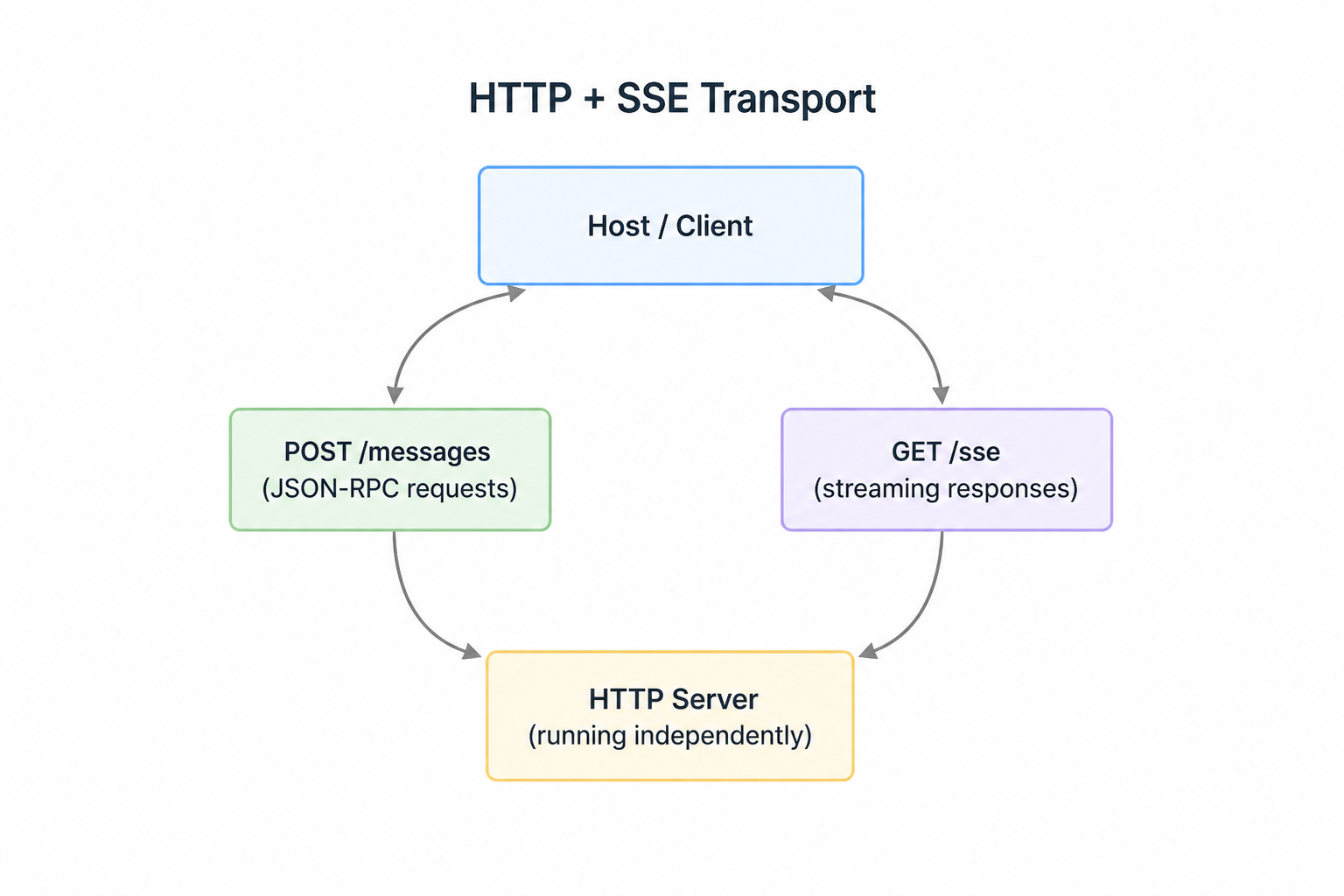 HTTP + SSE transport> WARNING
**Deprecation Notice: The original HTTP+SSE transport (from protocol version
2024-11-05) has been deprecated. Similarly, earlier revisions of Streamable HTTP (from versions2025-03-26through2025-11-25) that relied on persistent GET streams, connection sessions (Mcp-Session-Id), and resumable SSE streams viaLast-Event-IDare no longer part of the core spec.
It enables MCP clients to connect to remotely hosted servers over HTTP connections. Unlike the standard I/O transport that requires both client and server on the same machine, this transport opens up possibilities for public MCP servers that anyone can access. It is stateless transport.
However, there's an important gap here: some configuration settings can significantly limit our MCP server's functionality. If our application works perfectly with stdio locally but breaks when deployed with HTTP transport this is likely the culprit.
Legacy HTTP/SSE implementations suffer from architectural limitations, especially when deployed in serverless, edge, or strict cloud environment (Like Cloudflare workers, AWS Lambda, or behind tight load balancer).
3.3.1 The Challenge with standard HTTP
To understand the limitation of older HTTP implementations. Let's review how it works:
- Clients can easily initiate requests to servers (the server has a known URL)
- Servers can easily respond to these requests
- Problem: Servers cannot easily initiate requests to clients (clients don't have known URLs)
- Response patterns from client back to server become problematic:
MCP messages types get affected due to this problems ( We will discuss about MCP messages). This limitation impacts specific MCP communication patterns. This setups, we are forced to keep a long-lived GET stream open to push server-initiated requests and notifications like (logging or progress) The following message types become difficult to implement with plain HTTP:
- Server-initiated requests: Create Message requests, List Roots requests.
- Notifications: Progress notifications, Logging notifications, Initialized notifications, Cancelled notifications
These are exactly the features that break when we enable the restrictive HTTP settings.
The solution to above problem is:
To workaround different deployment constraints, frameworks(FastMCP) introduced two key configuration settings that dramatically limit functionality.:
- stateless_http: Controls connection state management. When set to True, it forces the server to disable the sessions.
- Json_response: Controls response format handling. When set to true. It forces the server to reponse with standard JSON instead of streaming events.
When forced to set these settings to True (common in serverless or API gateway environments, they break core MCP capabilities:
- Server-initiated Requests : sampling_callback, list_roots will fail
- Notifications: progress bars, real-time logging, cancellation cannot be delivered.
Transport Comparison Table. Choose the best for your use-cases:
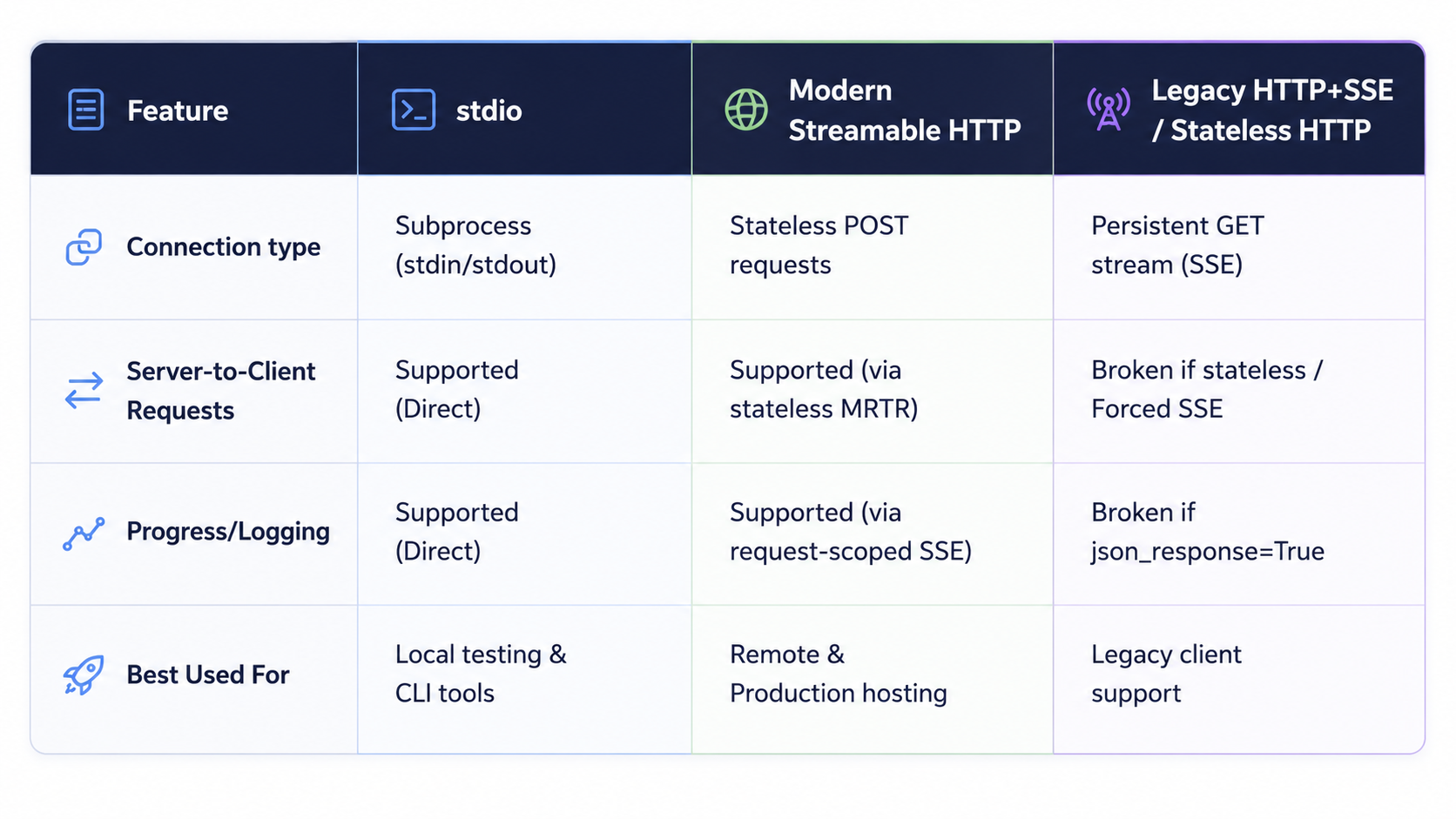 It's worth noting that a production-grade server architecture doesn't force you to rigidly choose between these protocols during development. A modularly designed MCP server can abstract the underlying transport layer entirely, allowing the application to seamlessly toggle between executing over local standard I/O streams or streaming events over the web right out of the box.
4. The three premitives: Tools, Resources, and Prompts
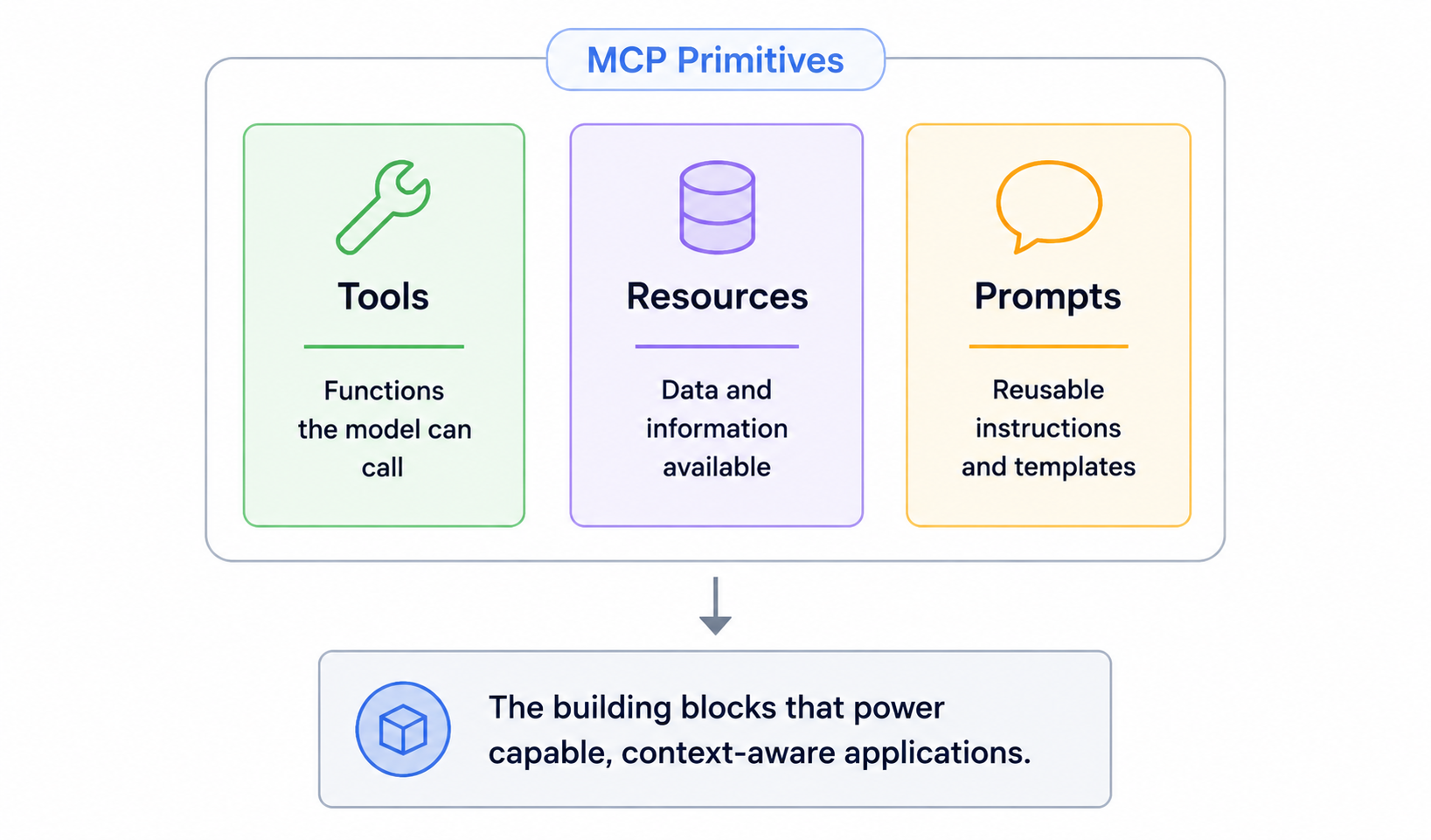 Three premitivesNow that we know how the server talks to the client, we can ask what does the server actually exposed to the client? The server exposes three things: tools, resources and prompts. Let's understand three of this(You can skip this part though)
4.1 Tools
A tool is a function the server exposes that the llm autonomously decides to call. A tool has a name, description and input schema. Based on user's message, llm figures out whether to call a tool or not.
So, we needs to be very careful when writing the description of the tool. It should be vague, and we shouldn't be lazy on it. Otherwise, tool will get called at the wrong time or it will never get called.
And tools have side effects. A tool can write to disk, hit a third-party API, insert a row in DB, send a slack message etc. So the llm is making real decisions with real consequences here. So tools must be designed carefully.
4.2 Resources
A resource is read-only data that our server exposes. A resource is identified by a URI like file:'//logs/app.log. It has no side effects like tools. We can think it as the GET endpoint of our MCP server.
"If the llm needs to reason about data, it needs the resource. It it needs to act or do something, it's a tool."
Example: If Claude wants to read a config file and summarize it. It needs resource. If it wants to update the content of the file it needs a tool. Keep this distinction very sharp and our architecture will stays clean while designing the MCP server.
4.3 Prompts:
Prompts are the most underused and under-explained primitive. They're reusable message templates that we can picks from the UI. You have seen some slash commands like /code-review, /grill-me, /summarize-pr etc. those are prompts usually. The user selects one, fills in some arguments, and the host uses our server's templates to construct the prompt. It's like controlling the starting context of an entire conversation in a session.
4.4 Roots:
While tools can alter reality and resources surface data, they cannot run wild on a user's machine. This is where Roots come in. Roots are explicit, client-defined directory paths or URI boundaries passed to the server. They act as a security firewall. Any well-built file intelligence engine relies on these roots to run strict path-validation checks, ensuring an AI model cannot perform path-traversal attacks (like trying to read /etc/shadow when it was only granted access to a project folder).
5. JSON-RPC 2.0: The protocol Underneath the transports
5.1 what is JSON-RPC 2.0?
It is transport agnostic (works over sockets, http, stdio etc), stateless, light-weight remote procedure call (RPC) protocol. And It is designed to be dead simple.
5.2 Message Format
All MCP communication happens through JSON-RPC 2.0 messages. Each message type serves a specific purpose - whether it's calling a tool, listing available resources, or sending notifications about system events. Understanding this helps us to debug the request issues.
A simple example: when Claude needs to call a tool provided by MCP server, the client sends a "Call Tool Eequest" message. The server processes this request, runs the tool, and responds with a "Call Tool Result" message containing the output.
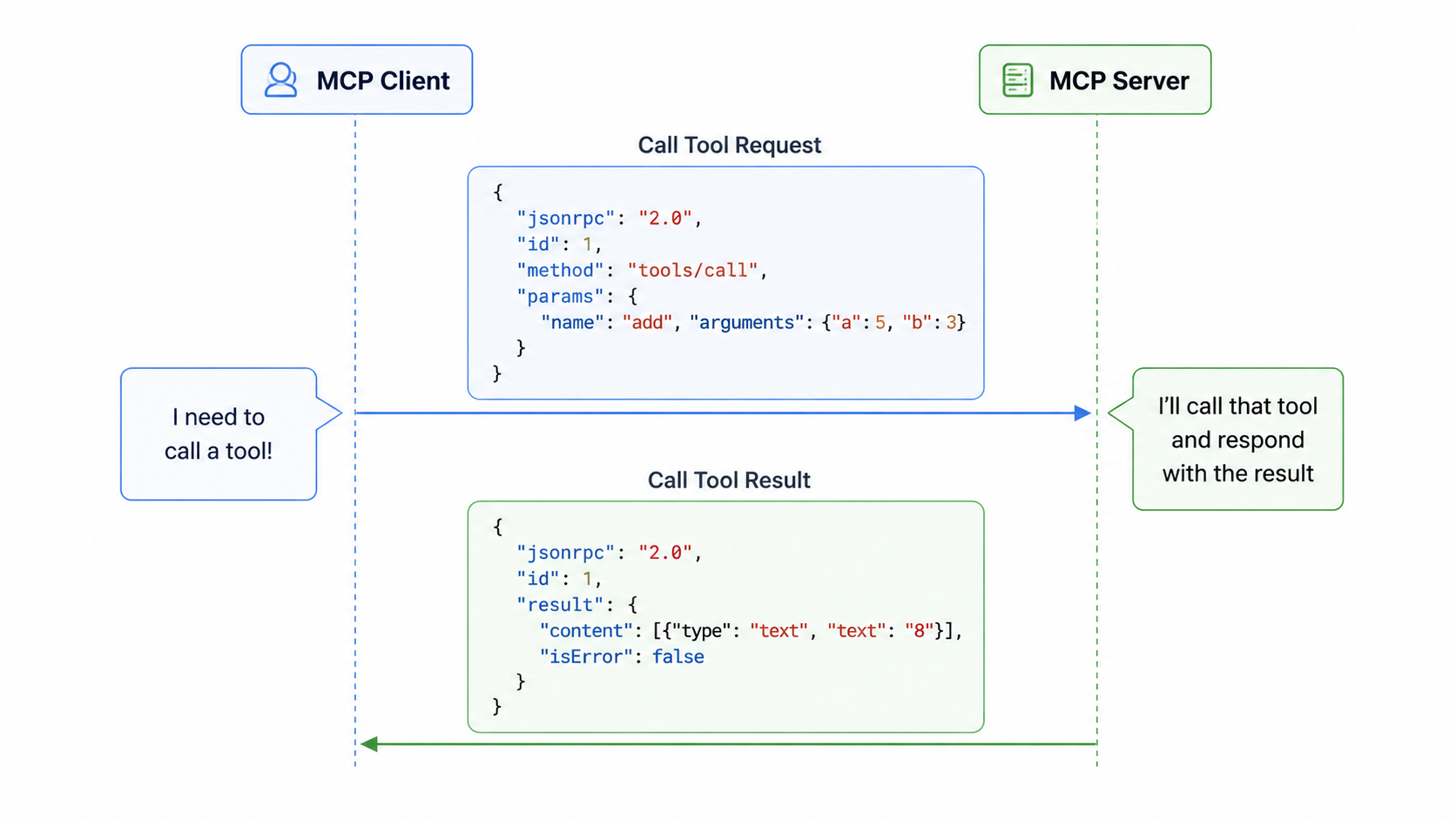 call tool request process### 5.3 Message Categories
MCP messages fall into two main categories:
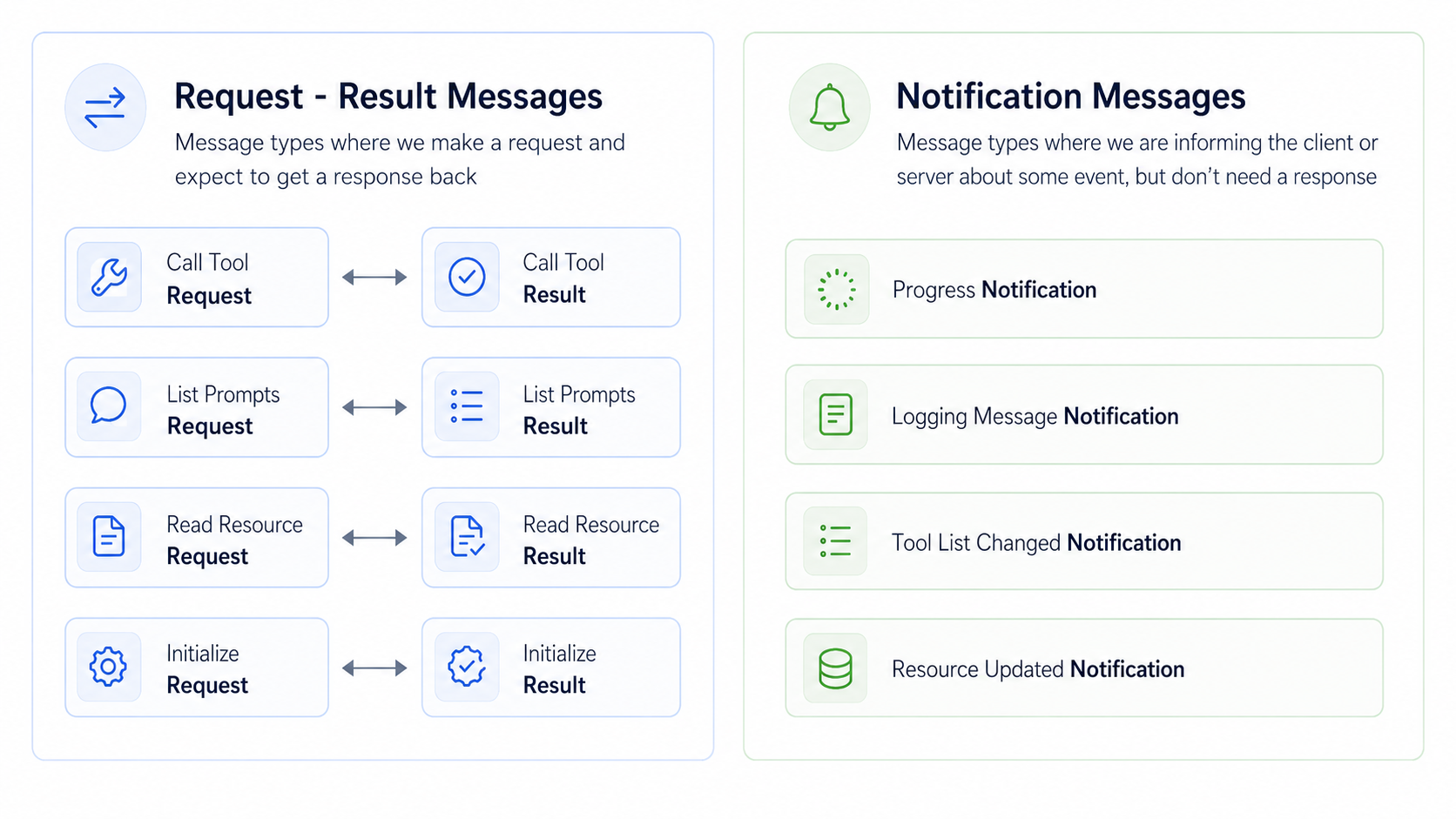 Request-Result MessagesThese messages always come in pairs. You send a request and expect to get a result back as seen in the above picture.
Notification MessagesThese are one-way messages that inform about events but don't require a response:
- Progress Notification: Updates on long-running operations
- Logging Message Notification: System log messages
- Tool List Changed Notification: When available tools change
- Resource Updated Notification: When resources are modified
To read about specification on the protocol visit this link JSON RPC 2.0 Specification
5.4 MCP Specification
The complete list of message types is defined in the official MCP specification repo on GitHub. The message types are written in TypeScript for convenience. Visit the link: shema.ts type ctrl + f then type client messages then you will see all type of client messages do the same for seeing server messages.
5.4.1 Client vs Sever Messages
MCP Specification organizes messages by who sends them:
- Client messages: It includes requests that clients send to servers and notifications that clients might send.
- Server messages: It include requests that servers send to clients and notifications that servers broadcast.
5.4.2 Why this matters?
Understanding that servers can send messages to clients is particularly important when working with different transport methods. Some transports, like the streamable HTTP transport, have limitations on which types of messages can flow in which directions.
The key insight is that MCP is designed as a bidirectional protocol - both clients and servers can initiate communication. This becomes crucial when you need to choose the right transport method for your specific use case.
6. The Initialization Handshake: What Happens Before Any Tool Is Called
This is the section nobody writes about. And it's the one that will bite you hardest in Part 2 when your server doesn't connect and you have no idea why.
Before a single tool gets listed, before a single resource gets fetched, before anything useful happens - the client and server run a three-step handshake. Miss a step or send something at the wrong time and the whole connection dies silently.
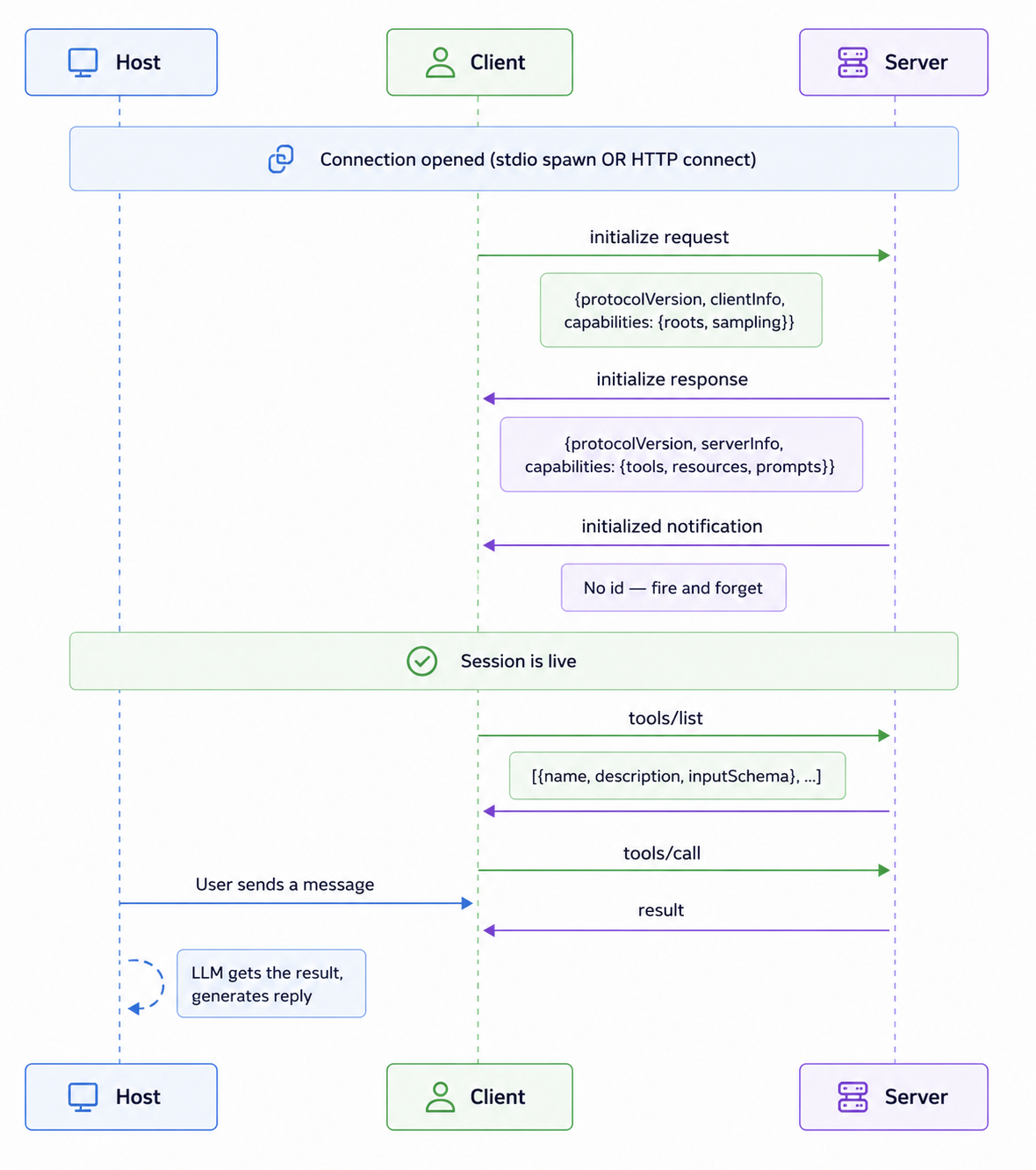 The Initialization HandshakeStep 1: initialize request. The client goes first. It tells the server: here's my protocol version, here's who I am, and crucially, here are my Roots ( the safe directory paths the server is allowed to interact with). The server intercepts these boundaries, processes them to set up its security firewall, and responds with its own version and the specific capabilities it exposes - tools, resources, prompts, or a combination of them.
Step 2: Version negotiation. Both sides have to agree on a protocol version. If the server returns a version the client doesn't understand, the connection is terminated. This is the spec's way of enforcing backward compatibility. As MCP evolves, this matters.
Step 3: initialized notification. The client sends this to signal it's done processing the init response and is ready to operate. No id — it's a Notification, so no response is expected. The moment this lands on the server side, the session is fully live. Only after all three steps does the client send tools/list. The server replies with all its tool definitions. The host takes those definitions and injects them into the LLM's context window. That's literally why Claude knows which functions it can call — it read them during this setup.
⚠️ The failure that catches everyone. If your server has a
print()orlogging.info()sending anything to stdout before the handshake completes - a startup message, a debug line, anything it corrupts the JSON-RPC stream. The client tries to parse your "Server started!" string as JSON-RPC and fails. You'll see a cryptic connection error with no obvious cause. In Part 2 we'll show exactly how to route logs to stderr instead. Pinning this here so you don't lose an hour to it.
Wrapping Up Part 1
Let's be honest about what just happened. We sat through a theory-heavy post with zero code. That's a lot to ask, but you now have a rock-solid mental model. Here's what we now have that most people building on top of AI don't:
We understand why MCP exists. We understand Host, Client, and a Server and why this separation is the whole point of MCP. We know stdio is for local, Streamable HTTP for production, and we know which one to reach for first. We know Tools act, Resources return data, and prompts are user-owned templates - and we know not to mix them up. We know that every message is JSON-RPC-2.0, we've seen a raw tool call on the wire, and we know the three-step handshake that has to succeed before any of it works.
That's the mental model you & I are sharing together now onwards.
While we mastered the low-level JSON-RPC wire protocol in this theory section so you can debug any stream error, we need to make sure you have the baseline coding skills before we start. In Part 2, we will step back from the advanced architecture and focus on the core engineering prerequisites: asynchronous Python (asyncio), operating system streams (stdio), and virtual environments. Master these first, and building your server in the subsequent parts will be a smoothie. See you in the next post! Consider subscribing to my newsletter with community of over 5k+ subscribers.
Reading progress
0% read
Auto-completes after you reach the end and linger for a moment.
You made it to the end
Get more like this in your inbox
Every week I write about machine learning, engineering patterns, and things I'm building. Practical, no fluff — straight to your inbox.
Subscribe to the newsletter
Get thoughtful updates on AI, engineering, and product work.